
Last updated: April 2026
Some links on this page are affiliate links. If you buy through them we may earn a small commission at no extra cost to you.
Most gamers overspend on motherboards. It is one of the most consistent and costly mistakes in PC building, and it happens because motherboard marketing is loud and spec sheets are intimidating. The truth is simpler than the industry wants you to believe: motherboards do not increase FPS. They support your components. The right motherboard for gaming is the one that matches your build tier, keeps your GPU budget intact, and gives you a stable platform without wasting money on features you will never use.
This guide covers the best motherboards for gaming 2026 the way LoadedRig covers everything else: by connecting each recommendation directly to a real build. There are three picks here. One for AM4 budget builds. Two for AM5. No filler.
If you are still deciding between AM4 and AM5 as platforms, read our AM4 vs AM5 Gaming 2026 guide before continuing. That decision comes before this one.
On This Page
- Quick Picks
- Comparison Table
- The Platform Decision
- Best Motherboard by Build Tier
- What Actually Matters in a Gaming Motherboard
- What Not to Overspend On
- Frequently Asked Questions
- Final Verdict
Quick Picks
If you want the short version, here are the three motherboards that power LoadedRig’s gaming builds. Each one has a specific job, and each one fits a specific build tier. These are the exact boards used across every LoadedRig build. If you are following a LoadedRig build guide, just buy the board listed in that build and move on.
Best Motherboards for Gaming 2026: Comparison at a Glance
| Board | Platform | Form Factor | Chipset | WiFi | LAN | Price |
|---|---|---|---|---|---|---|
| MSI PRO B550M-VC WiFi | AM4 | mATX | B550 | WiFi 6E | 1Gb | ~$80 |
| ASRock B650 Pro RS WiFi | AM5 | ATX | B650 | WiFi 6E | 2.5Gb | ~$130 |
| MSI MAG B850 Tomahawk MAX WiFi | AM5 | ATX | B850 | WiFi 7 | 5Gb | ~$230 |
If you spend $100 more on your motherboard, that is $100 less going toward your GPU. In a gaming build, that trade almost always makes your system worse.
The Platform Decision
If you are building new in 2026, AM5 is the right platform for any build above $1,000. It supports DDR5, gives you a confirmed upgrade path through Zen 6, and is where AMD’s current and future CPUs live. The ASRock B650 Pro RS WiFi and the MSI MAG B850 Tomahawk MAX WiFi both sit on AM5.
AM4 is still the correct platform for sub-$1,000 budget builds where keeping total system cost low means a stronger GPU. DDR4 is cheap, AM4 motherboards are cheap, and the Ryzen 5 5600 is still a capable gaming CPU. The MSI PRO B550M-VC WiFi is the right board for that scenario. AM4 has no forward CPU upgrade path, so go in knowing that an upgrade later means a full platform rebuild.
For the full breakdown of which platform makes sense for your situation, see our AM4 vs AM5 Gaming 2026 guide.
Best Motherboard by Build Tier
Best AM4 Budget Motherboard: MSI PRO B550M-VC WiFi
- Form Factor: mATX
- Socket: AM4
- Chipset: B550
- Memory: DDR4
- PCIe: 4.0 x16
- M.2 Slots: 2
- WiFi: 6E
- LAN: 1Gb
- Approx. Price: ~$80
The MSI PRO B550M-VC WiFi is the correct motherboard for any LoadedRig build under $1,000 targeting 1080p gaming. Its job is not to impress. Its job is to support the Ryzen 5 5600, stay out of the way, and keep as much of the budget as possible pointed at the GPU. It does all of that reliably.
What you get for around $80 is a mATX board with PCIe 4.0 support, WiFi 6E, two M.2 slots, and broad Ryzen 5000 compatibility. The WiFi inclusion is meaningful for builders who do not have an ethernet run to their desk. The PCIe 4.0 x16 slot handles any GPU in the current lineup without limitation. The form factor is mATX, so confirm your case supports it before ordering. Most do.
There are two honest tradeoffs worth knowing before you buy. First, the ethernet port is 1Gb/s rather than 2.5Gb/s. For most gaming and general use this is not a meaningful limitation, but if you regularly transfer large files over your home network it is worth noting. Second, the WiFi drivers need to be downloaded before the wireless adapter works, which means you will need a temporary ethernet connection or a USB drive with the drivers during initial setup. Neither of these is a reason to avoid the board, but they are worth knowing upfront rather than discovering during a build.
Who should buy it: Builders targeting 1080p gaming on a budget who want to maximize GPU spend. This is the board in our Best $800 Gaming PC Build for 1080p 2026 and our Best $1,000 Gaming PC Build for 1080p 2026.
Best AM5 Value Motherboard: ASRock B650 Pro RS WiFi
- Form Factor: ATX
- Socket: AM5
- Chipset: B650
- Memory: DDR5
- PCIe: 4.0 x16 (GPU slot)
- M.2 Slots: 2 (primary slot PCIe 5.0)
- WiFi: 6E
- LAN: 2.5Gb
- Other: BIOS Flashback
- Approx. Price: ~$130
The ASRock B650 Pro RS WiFi is the AM5 board that makes the $1,500 and $2,000 builds work. It is not the most impressive board on this list by spec. It is the board that keeps the GPU budget intact at the tiers where GPU quality matters most.
At around $130, it gets you onto the AM5 platform with DDR5 support, a 14+2+1 VRM design with DrMOS power stages, PCIe 5.0 M.2 support for the primary NVMe slot, WiFi 6E, and 2.5Gb LAN. The VRM handles Ryzen 5 and Ryzen 7 gaming CPUs at stock settings without issue. It is not built for extreme overclocking and it is not trying to be. For gaming builds running AMD’s CPUs at their intended operating parameters, it handles the job cleanly.
The AM5 upgrade path is a genuine advantage. Build around the B650 Pro RS today and you can drop in a future Ryzen chip, including Zen 6 when it arrives, without changing the motherboard or memory. That is the entire point of recommending AM5 at the $1,500 tier.
One note from real-world reviews: the top M.2 slot sits close to the primary PCIe x16 slot, which can make GPU removal slightly awkward if your graphics card has a backplate and you have the M.2 heatsink installed. It is not a common issue but worth knowing if you plan to swap GPUs or drives later.
Who should buy it: Builders on AM5 targeting 1440p gaming at the $1,500 or $2,000 tier who want to keep more budget for the GPU. This is the board in our Best $1,500 Gaming PC Build for 1440p 2026 and our Best $2,000 Gaming PC Build for 1440p/4K 2026.
Best AM5 High-End Motherboard: MSI MAG B850 Tomahawk MAX WiFi
- Form Factor: ATX
- Socket: AM5
- Chipset: B850
- Memory: DDR5 up to DDR5-8400
- PCIe: 5.0 x16 (GPU slot)
- M.2 Slots: 4 (two PCIe 5.0, two PCIe 4.0)
- WiFi: 7
- LAN: 5Gb
- Other: USB 20Gbps front panel header, Bluetooth 5.4
- Approx. Price: ~$230
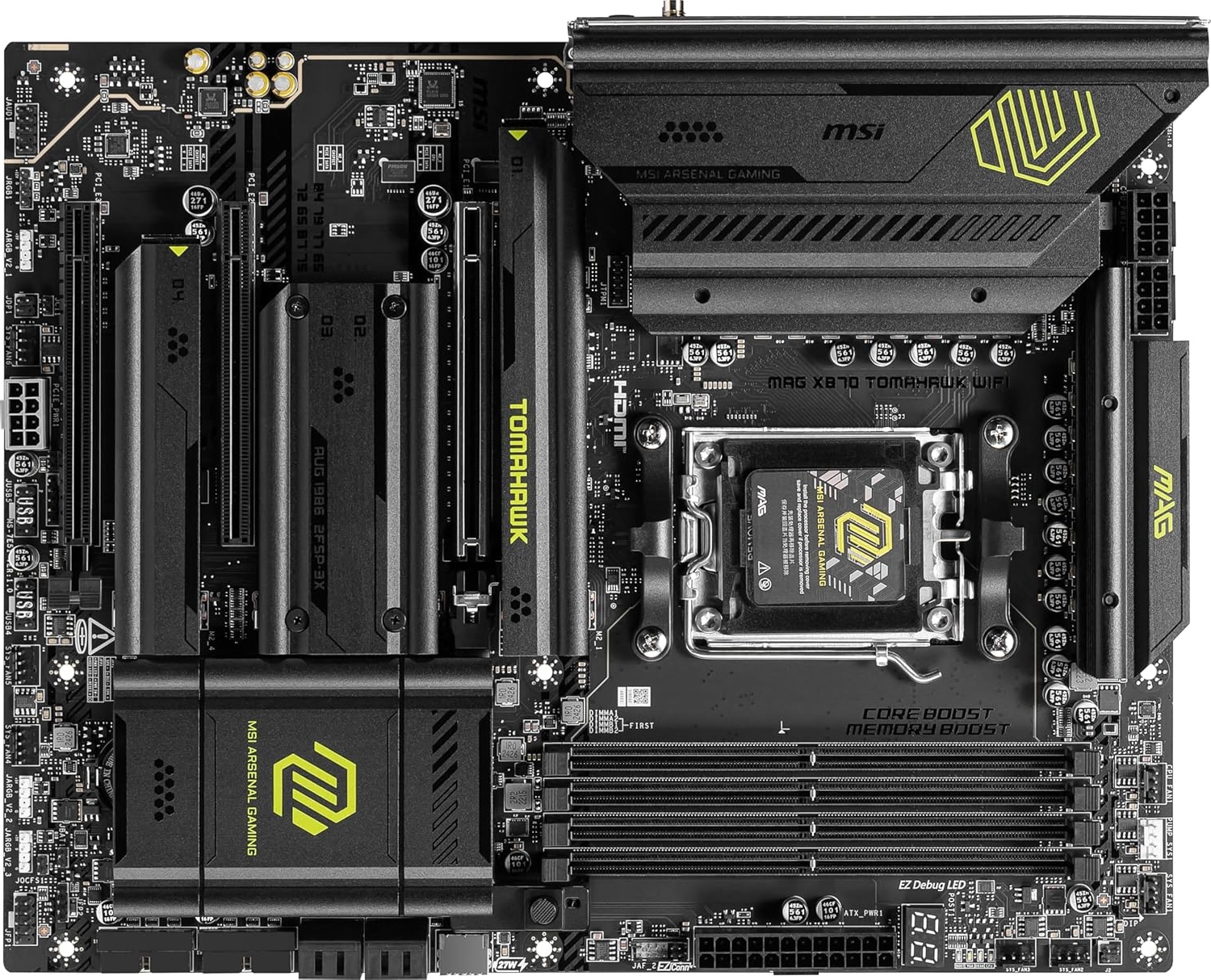
The MSI MAG B850 Tomahawk MAX WiFi is the board that earns its price. At around $230 it costs $100 more than the ASRock B650 Pro RS WiFi, and at the $2,500 build tier that premium makes sense. At lower build tiers it does not, which is exactly why this board only appears in the $2,500 build.
What the extra money buys: a stronger VRM with higher-rated power stages, WiFi 7 instead of WiFi 6E, 5G LAN instead of 2.5G, four M.2 slots with two running at PCIe 5.0 speeds, and a PCIe 5.0 x16 GPU slot. The jump from 2.5G to 5G LAN is meaningful for anyone on a high-speed home network. WiFi 7 can deliver better wireless performance and lower latency if your router and network support it, but for gaming the practical difference over WiFi 6E is small. Four M.2 slots gives you room to expand storage without adapters.
Review consensus from Tom’s Hardware, TechPowerUp, BabelTech Reviews, OC3D, and GeekaWhat points to the same conclusion: the B850 Tomahawk MAX performs on par with X870 boards in gaming with differences that fall within the margin of error. You are not leaving performance on the table by choosing B850 over X870. You are saving $70 to $150 and getting the same gaming results.
The Tomahawk line has a long track record of delivering exactly what the name implies: practical, well-built boards that skip cosmetic fluff and deliver on the features that matter. This is not a compromise pick at its tier. It is the confident recommendation.
Who should buy it: Builders at the $2,500 4K tier pairing this board with the RTX 5080 and Ryzen 7 9800X3D. This is the board in our Best $2,500 Gaming PC Build for 4K 2026.
What Actually Matters in a Gaming Motherboard
Most of the spec war around motherboards is irrelevant for gaming. Here is what actually matters and what you can safely ignore.
VRM Quality
The voltage regulator module delivers power to the CPU. A weak VRM throttles the processor under sustained load, which shows up as inconsistent frame times rather than lower average FPS. Every board on this list has a VRM adequate for the CPU it is paired with. The B550M handles the Ryzen 5 5600 cleanly. The B650 Pro RS handles Ryzen 5 and Ryzen 7 gaming CPUs at stock settings without issue. The B850 Tomahawk handles the Ryzen 7 9800X3D cleanly. You do not need to spend more to get better VRM performance at these CPU tiers.
Chipset
The chipset determines PCIe lane allocation, USB port count, and M.2 availability. For gaming, none of those differences translate into FPS. B550 is correct for AM4 budget builds. B650 is correct for AM5 mainstream builds. B850 is correct for AM5 high-end builds. X870 and X870E add mandatory USB4 and PCIe 5.0 GPU support, neither of which improves gaming performance at any current GPU tier.
Connectivity
WiFi and LAN matter for the actual experience of using the system. WiFi 6E is sufficient for gaming at every resolution and refresh rate. WiFi 7 adds real-world benefit in dense wireless environments but is not a gaming necessity. LAN speed matters more if you transfer large files between devices on your network than if you are gaming. 2.5Gb is plenty for gaming. 5Gb is a nice upgrade at the tier where it appears.
M.2 Slots
Two M.2 slots is sufficient for most gaming builds. Four slots gives headroom for future storage expansion without adapters. The number of M.2 slots does not affect gaming performance. It affects how easy it is to add storage later.
BIOS Quality
A good BIOS makes enabling EXPO memory profiles, updating firmware, and adjusting fan curves straightforward. All three boards here have solid BIOS implementations. The MSI boards use Click BIOS 5, which is one of the more approachable BIOS interfaces available. The ASRock BIOS is functional but slightly less polished visually. It does the job without hand-holding.
What Not to Overspend On
X870 and X870E Boards
These chipsets add mandatory USB4 (40Gbps) and mandatory PCIe 5.0 GPU support. Neither feature improves gaming performance in 2026. Current GPUs including the RTX 5080 and RX 9070 XT run identically on B850 and X870E in gaming scenarios. The price premium for X870 starts at around $300 and goes to $500 and above. That money is better spent on the GPU.
BCLK Overclocking
The B850 Tomahawk MAX WiFi II refresh adds an OC Engine chip for independent BCLK overclocking. For a gaming build running a Ryzen 7 9800X3D, a chip that does not benefit meaningfully from manual overclocking, this feature adds zero value. The original MAX at $230 is the correct pick.
RGB and Aesthetics
Motherboard RGB does not affect gaming performance. If your case has a tempered glass side panel and RGB matters to you, that is a personal preference worth spending on. If your goal is the best gaming performance per dollar, it is the last place to spend.
Integrated Audio
Motherboard audio is adequate for gaming headsets and speakers. You will not notice a difference between the Realtek ALC4080 on the B850 Tomahawk and the ALC897 on the B650 Pro RS while gaming. If you use studio monitors or audiophile headphones, a dedicated DAC is a better investment than a premium motherboard audio chip.
Frequently Asked Questions
Does a more expensive motherboard improve gaming FPS?
No. Motherboards do not increase FPS. They support your components. The gaming performance difference between a $130 B650 board and a $350 X870E board is within the margin of error in every review that has tested them side by side. Spend that gap on your GPU.
Is AM4 still worth it for a new build in 2026?
For a budget 1080p build under $1,000 where every dollar saved on platform goes toward a better GPU, yes. The Ryzen 5 5600 and MSI PRO B550M-VC WiFi combination is still a capable starting point. For any build above $1,000 targeting 1440p or higher, AM5 is the correct platform. AM4 has no forward CPU upgrade path, so factor that in if you plan to upgrade the processor later.
Do I need WiFi 7 for gaming?
No. WiFi 6E is more than sufficient for online gaming at any resolution or refresh rate. WiFi 7 delivers real improvement in dense wireless environments and high-bandwidth applications, but for gaming the practical difference is small. The B850 Tomahawk includes WiFi 7 because it fits the high-end build tier. The lower tier boards include WiFi 6E, which is the right spec for their position.
Can the ASRock B650 Pro RS WiFi handle the Ryzen 7 9800X3D?
Yes. The B650 Pro RS has a 14+2+1 VRM with DrMOS that can handle the 9800X3D at stock settings without throttling. That said, if you are building at the highest tier with a stronger GPU and more total budget, the B850 Tomahawk is the cleaner match because it gives you stronger connectivity, more M.2 expansion, and a better overall fit for a premium build.
What is the difference between B650 and B850?
B850 boards often add stronger VRMs, WiFi 7 support, faster LAN options, and better M.2 slot allocation at the motherboard level. In gaming, the performance difference is negligible. The meaningful differences are connectivity and build quality at the higher end. B650 is correct for mainstream AM5 builds. B850 makes sense when the rest of the build is at a tier that justifies it.
Should I buy B850 or X870?
For gaming, B850. The X870 and X870E chipsets add mandatory USB4 and mandatory PCIe 5.0 GPU support, neither of which improves gaming performance at any current GPU tier. Multiple reviews including Tom’s Hardware confirm B850 boards perform within the margin of error of X870E boards in gaming. The B850 Tomahawk MAX WiFi at $230 is a better value than any X870 board for a gaming-first build.
Final Verdict
The best motherboards for gaming 2026 are not the ones with the longest spec sheets. They are the ones that do not steal budget from your graphics card.
The MSI PRO B550M-VC WiFi is the right call for AM4 budget builds targeting 1080p. It keeps platform cost low, supports the Ryzen 5 5600 without compromise, and leaves money where it matters. The AM4 platform is a dead end for future CPU upgrades, which is the only honest limitation worth naming.
The ASRock B650 Pro RS WiFi is the right call for AM5 builds at the $1,500 and $2,000 tiers. It gets you onto a modern DDR5 platform with a real upgrade path, sufficient VRM for every CPU in those builds, and enough connectivity for any gaming setup, without the $90 to $100 premium of the next board up the ladder.
The MSI MAG B850 Tomahawk MAX WiFi earns its position at the $2,500 tier. At that budget level the CPU and GPU are already at the top of what LoadedRig recommends, and the B850 Tomahawk scales appropriately. WiFi 7, 5G LAN, four M.2 slots, and gaming performance matching far more expensive X870 boards make it the right capstone for the build ladder.
If you are not sure which build tier is right for your setup, start with our PC Builds section. If you want to match your GPU to the right monitor, use our GPU Monitor Match Tool. And if you are still unsure about the motherboard, default to the board in your build guide. That is the simplest and most reliable way to get this decision right.
More From LoadedRig
- GPU Tier List 2026: Which Graphics Card Do You Actually Need?
- AM4 vs AM5 Gaming 2026
- Best CPUs for Gaming 2026
- Best Budget CPUs for Gaming 2026
- DDR4 vs DDR5 for Gaming 2026
- Best $800 Gaming PC Build for 1080p 2026
- Best $1,000 Gaming PC Build for 1080p 2026
- Best $1,000 Gaming PC Build for 1440p 2026
- Best $1,500 Gaming PC Build for 1440p 2026
- Best $2,000 Gaming PC Build for 1440p/4K 2026
- Best $2,500 Gaming PC Build for 4K 2026