
Last updated: April 2026
Some links on this page are affiliate links. If you buy through them we may earn a small commission at no extra cost to you.
If you are building or upgrading a gaming PC in 2026, the RAM capacity question keeps coming up: do you actually need 32GB, or is 16GB still enough for how you play? It is a good question, and most answers online miss what actually matters. This guide cuts through the noise and gives you a clear answer based on how much RAM you need for gaming today.
We are not going to waste your time explaining what RAM is. If you are here, you already know it is part of the system. What you want to know is whether spending more on capacity actually changes how your games run, and when cutting back on RAM is a smart tradeoff versus a mistake that costs you later. That is exactly what this guide covers.
The most common mistake in 2026 is building a system with a strong GPU and cutting back to 16GB of RAM to save money. It looks fine on paper, but in real games it leads to stutter, inconsistent frame pacing, and a system that ages faster than it should. RAM is one of the easiest places to accidentally create a bottleneck.
On This Page
- Quick Answer
- What RAM Actually Affects in Gaming
- 16GB vs 32GB vs 64GB: The Real Differences
- When 16GB Is Still Enough
- When 32GB Becomes the Smarter Buy
- Should You Upgrade from 16GB to 32GB?
- When 64GB Makes Sense
- How RAM and VRAM Interact
- RAM Speed vs Capacity
- What Not to Do
- Our RAM Picks
- Frequently Asked Questions
- Final Verdict
Quick Answer: How Much RAM Do You Need for Gaming in 2026?
32GB is the right default for any new gaming build in 2026. It is not a luxury upgrade anymore. It is the baseline that avoids stutter, handles modern AAA games, and gives your system real longevity. 16GB still works in budget builds where every dollar goes toward GPU performance, but it is no longer the safe recommendation. 8GB is not viable. 64GB is unnecessary for gaming alone. For kit recommendations, see our Best RAM for Gaming 2026 guide.
16GB only makes sense on budget AM4 builds where the savings directly improve your GPU tier. Outside of that specific scenario, it is a compromise you will notice in modern games.
What RAM Actually Affects in Gaming
RAM does not boost your average FPS the way a GPU upgrade does. What it actually determines is how consistently your games run over time. The practical impact of RAM shows up in frame pacing, 1% lows, and whether games stutter when assets are loading or multiple applications are competing for memory.
When a game needs more RAM than your system has available, it starts pulling from the pagefile on your storage drive. That is significantly slower than actual system memory, and the result is not a gradual performance drop. It is sudden, jarring frame time spikes. The kind of stutter that makes a game feel broken even when the average FPS looks fine on paper.
This is why RAM capacity matters more than speed for most gaming scenarios. A system with 32GB running at a modest speed will deliver a smoother experience than a system with 16GB of the fastest RAM available, in any game that pushes memory usage past the 16GB threshold.
The Background App Reality
Most gamers are not running games in a vacuum. Discord, a browser with open tabs, streaming software, and a music app can consume 3GB to 6GB of system RAM before a game even loads. On a 16GB system that leaves 10GB to 13GB for the game itself. In 2026, that margin is thin for demanding open-world titles and getting thinner every year as game memory requirements increase.
16GB vs 32GB vs 64GB: The Real Differences
Here is what each capacity tier actually delivers in a gaming context, without the marketing language.
16GB
Still workable in many games, but increasingly a tight fit. Most esports titles and older games run fine on 16GB. Modern AAA open-world games are starting to push past it in demanding scenarios, and the combination of a game running near the 16GB ceiling alongside background apps is where stuttering starts to appear. TechSpot’s 2026 testing found that some newer titles require closer to 20GB for a consistently smooth experience, putting 16GB in a position where it passes in some games and struggles in others. It is not a crisis today, but it is no longer the comfortable recommendation it was two or three years ago.
32GB
The right answer for most gaming builds in 2026. 32GB gives every current title enough headroom to run without hitting memory limits, covers background apps without competition, and positions your system well for the next several years. TechSpot’s testing consistently shows 32GB delivering the same gaming performance as 64GB in normal use, which means you are not leaving performance on the table compared to a more expensive configuration. For any new build, 32GB is the baseline we recommend, not a premium upgrade.
64GB
No meaningful gaming benefit over 32GB in standard use. 64GB makes sense if you are editing video, running large mod setups that consume unusual amounts of memory, or doing professional workstation tasks alongside gaming. For a pure gaming build, the money spent going from 32GB to 64GB is better put toward GPU or storage.
When 16GB Is Still Enough
16GB remains a defensible choice in specific situations. It is not the right call for every build, but writing it off entirely would be dishonest.
- Budget AM4 builds under $1,000. When every dollar saved on platform and memory goes directly toward a stronger GPU, that tradeoff makes sense. The GPU is what determines how your games actually look and run. Our $1,000 1080p gaming PC build uses 16GB DDR4-3600 for exactly this reason. For GPU options at this budget, see our Best GPUs for 1080p Gaming 2026 guide.
- Esports and competitive gaming focused builds. If your game library is primarily titles like Valorant, CS2, Apex Legends, or Fortnite, those games are not pushing anywhere near 16GB. You are not leaving performance on the table in those titles with 16GB.
- Upgrading an existing system short-term. If you already have 16GB and are not experiencing stutter in the games you actually play, there is no urgent reason to upgrade today. Monitor your RAM usage in Task Manager while gaming. If you are consistently hitting 90% or more, that is the signal to add more.
When 32GB Becomes the Smarter Buy
32GB is the right call in most scenarios outside of the specific budget situations above. Here is where the upgrade pays off clearly.
- Any new AM5 build. If you are building on AM5, start with 32GB. The platform costs more than AM4 and the builds that make sense on AM5 are generally at price points where 32GB is the correct baseline. There is no good reason to build an AM5 system with 16GB in 2026.
- Modern AAA gaming at 1440p or 4K. Games like Mafia: The Old Country, Hogwarts Legacy, and other demanding open-world titles push harder with higher texture settings and benefit from 32GB headroom. TechSpot’s testing found that some of these titles require closer to 20GB for smooth frame pacing, making 32GB the comfortable target rather than a luxury. See our Best GPUs for 1440p Gaming 2026 guide for GPU recommendations at this resolution.
- Gaming with background apps running. If you stream, keep a browser open, use Discord, or run any other applications alongside games, 32GB removes the memory competition entirely. Your game gets what it needs and your background apps do not have to fight for the remainder.
- Builds you plan to keep for 3 or more years. Game memory requirements have been climbing consistently. 32GB gives you meaningful runway before capacity becomes a constraint. 16GB on a system you plan to keep through 2028 and beyond is a risk.
- Builds paired with an 8GB GPU. This one matters more than most buyers realize. See the section below on how RAM and VRAM interact.
See our GPU Tier List 2026 to understand how your GPU choice affects memory pressure.
Should You Upgrade from 16GB to 32GB?
If you already have 16GB, this is the only upgrade decision that actually matters for system smoothness in 2026. The decision comes down to how your system behaves today. If you are seeing stutter in modern AAA games, running into high memory usage with background apps, or planning to keep your system for several more years, moving to 32GB is a meaningful upgrade. If your current games run smoothly and you are not hitting memory limits, you can wait. Monitor usage while gaming. Consistently hitting 85% to 90% RAM usage is your signal to upgrade. If you are already near the limit, upgrading to 32GB is one of the easiest ways to improve overall system smoothness without changing your GPU.
When 64GB Makes Sense
64GB is not a gaming recommendation. It is a workstation recommendation for people who also game. If any of the following describes you, 64GB is worth considering.
- You edit video in Premiere Pro, DaVinci Resolve, or similar tools with large project files
- You run large mod setups on games like Skyrim or Fallout that load unusual amounts of assets into memory
- You use local AI tools or run virtual machines alongside your normal workflow
- You stream and record simultaneously with high-quality local recording settings
If none of those apply and you are building a gaming PC, stop at 32GB. The money saved is better spent elsewhere.
How RAM and VRAM Interact
This is the angle most RAM guides skip over, and it is increasingly relevant in 2026 with 8GB GPUs still common at the budget tier.
When a game pushes more data than your GPU’s VRAM can hold, the overflow has to go somewhere. On modern Windows systems, that overflow spills into system RAM first and then into the pagefile on your drive if system RAM is also under pressure. The result is frame time spikes and stutter that feels disproportionate to what the benchmark numbers would suggest.
TechSpot’s 2026 testing demonstrated this directly. In Spider-Man 2, an 8GB GPU running with 16GB of system RAM produced significantly worse 1% lows than the same GPU running with 32GB of system RAM. The card was overflowing its VRAM budget and the additional system RAM gave it a larger, faster buffer to work with before hitting the pagefile. The average FPS difference was small. The minimum frame rate difference was substantial.
The practical takeaway is simple: if you are building with an 8GB GPU like the RX 9060 XT 8GB or the RTX 5060 Ti 8GB, 32GB of system RAM is not optional. It is the correct pairing. 16GB system RAM paired with an 8GB GPU in demanding titles is a combination that punishes you at both ends simultaneously.
See our 8GB vs 16GB VRAM for Gaming 2026 and How Much VRAM Do You Need for Gaming 2026 for the full picture.
RAM Speed vs Capacity: Get Capacity Right First
Speed matters, but less than most buyers think, and significantly less than capacity. The practical advice is simple: get the capacity right, then hit the platform sweet spot for speed, and stop there.
AM5 Speed Sweet Spot
DDR5-6000 CL30 is AMD’s confirmed optimal frequency for Ryzen 7000 and 9000 series processors. At this speed the memory controller runs in its most efficient configuration. Going above DDR5-6000 pushes most Ryzen chips into a less efficient mode where the latency penalty often cancels out the bandwidth gain. Spend the budget on 32GB at DDR5-6000 rather than 16GB at a higher speed tier.
AM4 Speed Sweet Spot
DDR4-3600 CL16 is the established sweet spot for Ryzen 5000 on AM4. It runs the Infinity Fabric in its optimal configuration without overclocking complexity. Going above DDR4-3600 produces diminishing returns and can introduce stability issues without meaningful gaming gains.
What Speed Actually Changes
RAM speed has the most impact in CPU-limited scenarios, primarily at 1080p in competitive titles at high refresh rates. At 1440p and above, the GPU is doing the heavy lifting and memory bandwidth differences between speed tiers become very small. Hitting the platform sweet spot captures most of the available gain. Chasing higher speeds with tight timings costs significantly more for returns you will not notice in real games. For a deeper breakdown of platform memory differences, see our DDR4 vs DDR5 for Gaming 2026 guide.
What Not to Do
- Do not buy 8GB of RAM for a new gaming build. It was marginal two years ago and it is not a serious option in 2026. Background apps alone will eat into available memory before a game even loads.
- Do not buy 16GB for a new AM5 build. AM5 builds are at price points where 32GB is the right baseline. Cutting to 16GB on AM5 is saving money in the wrong place.
- Do not buy mismatched RAM kits. Two sticks from the same kit run in dual-channel mode and are guaranteed compatible. Mixing random sticks can cause instability and forces the system to run at the slower stick’s speed.
- Do not chase RAM speed over capacity. 16GB at DDR5-7200 is worse for gaming in 2026 than 32GB at DDR5-6000. Capacity is the variable that actually changes how games run.
- Do not skip enabling XMP or EXPO in BIOS. RAM ships at a safe default speed well below its rated spec. If you buy DDR5-6000 and never enable EXPO in BIOS, you are running it at DDR5-4800 or lower. This is one of the most common and most avoidable performance mistakes in new builds.
Our RAM Picks
These are the exact kits we recommend based on platform compatibility and real-world gaming performance. Hit the capacity target, stay at the platform sweet spot, and move on. For a full breakdown of every option including budget DDR5 alternatives, see our Best RAM for Gaming 2026 guide.
Frequently Asked Questions
How much RAM do you need for gaming in 2026?
32GB is the recommended standard for any new gaming build in 2026. It handles all current titles comfortably, supports background apps without memory competition, and gives you meaningful headroom as game requirements increase. 16GB is still workable on budget AM4 builds where the savings go toward GPU, but it is no longer the safe default it once was.
Is 16GB RAM still good enough for gaming?
In many games, yes. In some newer demanding titles, no. 16GB is increasingly a tight fit in modern AAA open-world games, especially when background apps are running at the same time. For esports titles and competitive gaming it is still comfortable. For a new AM5 build, 32GB is the better baseline. For a budget AM4 build where every dollar goes toward GPU, 16GB DDR4-3600 remains a defensible choice.
Does more RAM improve FPS in games?
Not dramatically in most cases. The bigger impact of RAM capacity is on frame consistency and 1% lows rather than average FPS. When a game runs out of available RAM and starts using the pagefile, the result is sudden frame time spikes and stutter rather than a gradual FPS reduction. 32GB eliminates that risk across all current titles.
Does system RAM matter if I have a GPU with 8GB VRAM?
Yes, more than most buyers expect. When an 8GB GPU overflows its VRAM budget in a demanding game, the excess data spills into system RAM. If system RAM is also limited to 16GB, that overflow hits a second bottleneck and produces severe frame time spikes. 32GB of system RAM paired with an 8GB GPU gives the overflow traffic a much larger buffer to work with before hitting the pagefile, which materially improves 1% lows in GPU-limited scenarios. See our 8GB vs 16GB VRAM guide for the full breakdown.
Is 64GB RAM worth it for gaming?
No, for gaming alone. TechSpot’s 2026 testing shows 64GB delivers no meaningful gaming benefit over 32GB in standard use. 64GB makes sense if you are also editing video, running large mod setups, using local AI tools, or doing memory-intensive professional work alongside gaming. For a pure gaming build, stop at 32GB and put the difference toward GPU or storage.
What RAM speed should I get for AM5?
DDR5-6000 CL30 is AMD’s confirmed sweet spot for Ryzen 7000 and 9000 series processors. At this speed the memory controller runs in its most efficient configuration. Going above DDR5-6000 typically pushes the controller into a less efficient mode where the latency penalty cancels out the bandwidth gain. Prioritize getting 32GB at DDR5-6000 over 16GB at a higher speed tier.
What RAM speed should I get for AM4?
DDR4-3600 CL16 is the sweet spot for Ryzen 5000 on AM4. It runs the Infinity Fabric in its optimal configuration without overclocking complexity. Going above DDR4-3600 produces diminishing returns and can create stability issues without meaningful gaming gains. CL16 is worth targeting over CL18 at the same frequency if available at a similar price.
Final Verdict
The question of how much RAM you need for gaming in 2026 has a clear answer for most builders: 32GB. It is not a luxury upgrade anymore. It is the baseline for any modern gaming PC in 2026, handling every current title, covering real-world multitasking, and keeping your system relevant for the next several years without compromise.
16GB still makes sense in one specific situation: a budget AM4 build where saving on memory puts meaningfully more money toward GPU. Outside of that scenario, 16GB is a tradeoff you will notice in demanding games and feel in background app performance, and it becomes a bigger problem the longer you keep the system.
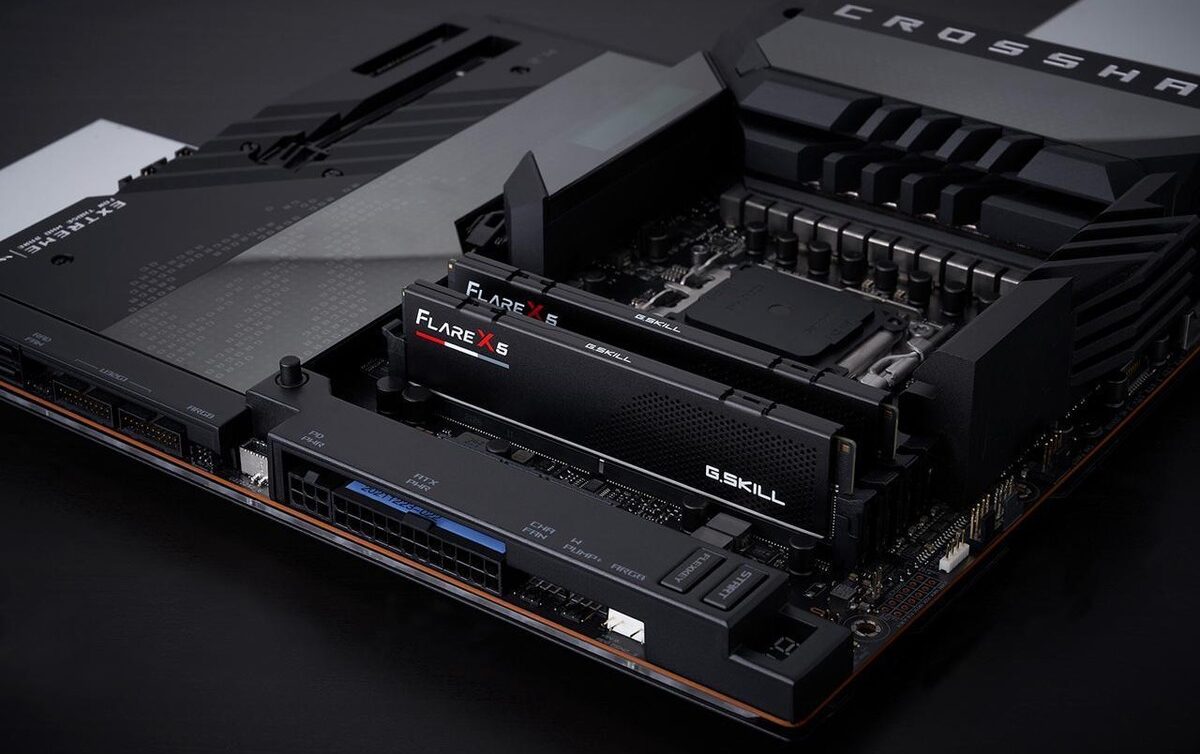
For AM5 builds, pair your platform with the G.Skill Flare X5 32GB DDR5-6000 CL30. It hits AMD’s confirmed sweet spot with tight CL30 timings and EXPO certification for plug-and-play setup. For AM4 budget builds, the G.Skill Ripjaws V 16GB DDR4-3600 CL16 is the correct configuration for Ryzen 5000 and keeps platform cost where it needs to be.
RAM pricing has been volatile in 2026 due to a global DRAM shortage. Always check current prices before ordering. The figures referenced in this guide are approximate at time of research. For full kit comparisons and backup options, see our Best RAM for Gaming 2026 guide.