
Last updated: April 2026
Some links on this page are affiliate links. If you buy through them we may earn a small commission at no extra cost to you.
If you are shopping for the best 1440p 165Hz gaming monitors 2026, most displays in this category now run at 170-180Hz, and that is exactly the performance tier this guide covers. The 165Hz label has become shorthand for a full class of monitors where modern mid-range GPUs like the RX 9070, RTX 5070, and RX 9060 XT deliver their best real-world experience at 1440p. If you are pairing a capable GPU with a new monitor this year, this is the tier you are shopping in.
What has changed in this category is the technology split. A few years ago, choosing a 1440p gaming monitor meant picking between fast IPS motion clarity or high VA contrast and accepting you could not have both at a reasonable price. That tradeoff has largely collapsed. Today you can get a well-tuned IPS monitor with excellent motion handling for under $300, or a Mini LED VA monitor with genuine HDR performance: over 1,000 nits of brightness and thousands-to-one contrast, for roughly the same money. Those are two genuinely different products serving two genuinely different use cases, and most buying guides blur the line between them.
This guide does not. We cover three monitors across two clear paths: IPS panels for competitive and all-around gaming performance, and a Mini LED VA panel for buyers who want real HDR and contrast depth at 1440p without spending OLED money. If you are pairing these monitors with a mid-range GPU, check our Best GPUs for 1440p Gaming 2026 guide for matched recommendations.
On This Page
- Quick Picks
- Monitor Comparison
- How We Chose
- Best Overall: ASUS ROG Strix XG27ACS
- Best for Console and Multi-Device: Alienware AW2725DM
- Best HDR Value: AOC Q27G3XMN
- IPS vs Mini LED: Which Is Right for You?
- Is 165Hz or 180Hz Better?
- GPU Pairing Guide
- Frequently Asked Questions
- Final Verdict
Quick Answer: What Is the Best 1440p 165Hz Gaming Monitor in 2026?
For most gamers, the ASUS ROG Strix XG27ACS is the best overall pick. It delivers the cleanest motion performance, exceptional factory calibration, and the most consistent experience across all game types at this price point. If HDMI 2.1 connectivity for a console or secondary device matters to you, the Alienware AW2725DM is a direct price competitor with a meaningful connectivity advantage. If your gaming skews toward visually ambitious single-player titles and you want genuine HDR contrast that IPS panels cannot match, the AOC Q27G3XMN is in a different category entirely. Mini LED backlighting at a price that would have been impossible two years ago.
Quick Picks
These three monitors cover the full range of what most 1440p gamers actually need in 2026. Each one serves a distinct buyer with no filler picks in the lineup.
Monitor Comparison
Here is how the three monitors stack up across the specs that actually matter for 1440p gaming.
| Monitor | Panel | Refresh Rate | HDR | Best For |
|---|---|---|---|---|
| ASUS ROG Strix XG27ACS | Fast IPS | 180Hz | DisplayHDR 400 | Best overall PC gaming |
| Alienware AW2725DM | Fast IPS | 180Hz | DisplayHDR 400 | Console and multi-device |
| AOC Q27G3XMN | VA Mini LED | 180Hz | DisplayHDR 1000 | Real HDR and contrast |
How We Chose
We focused exclusively on the 165-180Hz performance tier at 1440p, the sweet spot where most mainstream GPUs deliver their best real-world experience. We did not include 144Hz monitors because the market has moved past that standard, and we did not include 240Hz monitors because that is a different buyer with different GPU requirements and different priorities.
Panel Tuning Over Raw Specs
Response time numbers on a spec sheet tell only part of the story. What actually matters is how well the panel handles overdrive across the full refresh rate range, especially in VRR situations where the frame rate fluctuates. Every monitor in this guide was evaluated on real-world motion handling, not just the claimed 1ms figure.
Distinct Buying Decisions Only
Each monitor in this guide serves a different buyer. We do not include monitors that overlap in position or serve the same use case. If we cannot clearly explain why a pick exists, it does not belong in the guide.
Confirmed Purchase Path
Every monitor in this guide has a confirmed active Amazon affiliate link. We do not recommend monitors we cannot stand behind with a clean purchase path.
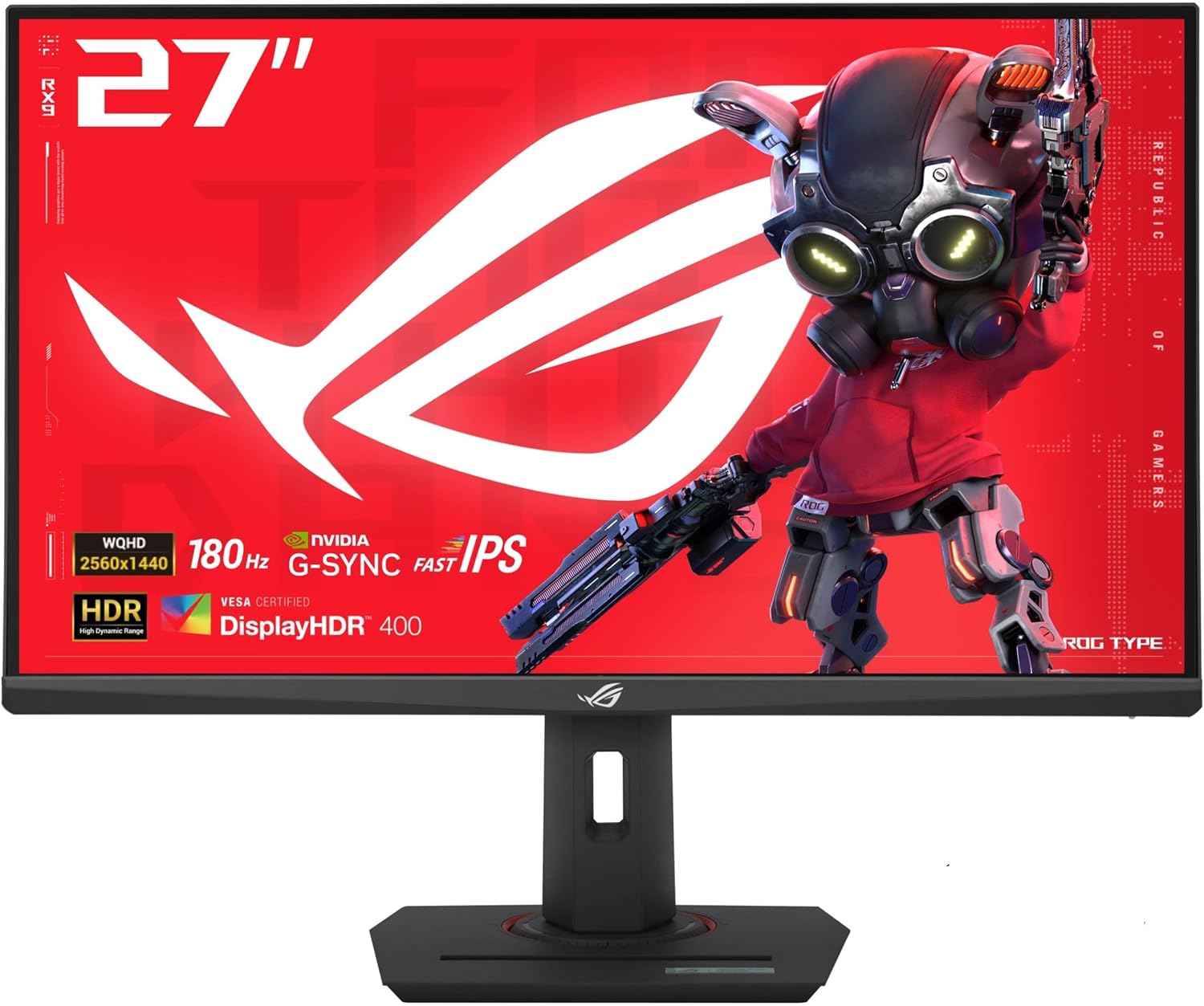
Best Overall 1440p 165Hz Gaming Monitor: ASUS ROG Strix XG27ACS
- Screen Size: 27-inch
- Resolution: 2560×1440
- Panel: Fast IPS
- Refresh Rate: 180Hz native
- Response Time: 1ms GtG
- HDR: DisplayHDR 400
- Connectivity: 1x DisplayPort 1.4, 2x HDMI 2.0, 1x USB-C (7.5W)
The ASUS ROG Strix XG27ACS is the monitor we would recommend to most 1440p gamers without hesitation. It does not do anything exotic. No Mini LED backlight, no 240Hz, no OLED panel. But it executes the fundamentals better than anything else at this price. The 180Hz refresh rate is native, not overclocked. The Fast IPS panel uses variable overdrive that is unusually well-tuned for a sub-$300 monitor, meaning you can leave the settings on default and get clean motion at any refresh rate without digging through the overdrive menu every time your frame rate changes.
What separates the XG27ACS from similarly priced competitors is the factory calibration. Most monitors in this category require at least some out-of-box adjustment. The ASUS does not. Color accuracy is exceptional. Independent reviewers have measured deltaE averages under 0.5, which is remarkable for a monitor at this price. You get 97% DCI-P3 color coverage and accurate grayscale tracking without touching a single setting. The ELMB blur reduction mode is also worth noting: unlike most monitors where blur reduction and Adaptive-Sync are mutually exclusive, the XG27ACS runs both simultaneously, giving you the option of maximum motion clarity at any frame rate.
The HDR support is DisplayHDR 400 with no local dimming. We will be direct about this: HDR on the XG27ACS is cosmetic. The image is brighter in HDR mode and colors are more saturated, but there are no deep blacks, no true high-contrast HDR scenes, and no meaningful difference from a well-calibrated SDR image. If genuine HDR is a priority, the AOC Q27G3XMN further down this page is the right choice. If you primarily game in SDR and want the best possible motion clarity and color accuracy for the money, the ASUS is the clear recommendation.
One connectivity note worth flagging: the two HDMI ports are version 2.0, which caps the refresh rate at 144Hz over HDMI. Hitting 180Hz requires DisplayPort. The USB-C port supports display output and 7.5W power delivery, useful for single-cable laptop connections but not enough wattage to charge most modern laptops. There is no USB hub. The stand is fully adjustable with height, tilt, swivel, and pivot to portrait mode. The design is clean without being flashy. No RGB lighting keeps the aesthetic professional and desk-agnostic.
Who should buy it: Anyone building or upgrading to a 1440p gaming setup who wants the safest, best-tuned IPS monitor at this price. This is the default recommendation for the majority of readers.
Bottom line: The best all-around pick in this guide. Buy this if you are unsure which monitor fits your setup and it will not let you down.
Best for Console and Multi-Device: Alienware AW2725DM
- Screen Size: 27-inch
- Resolution: 2560×1440
- Panel: Fast IPS
- Refresh Rate: 180Hz native
- Response Time: 1ms GtG
- HDR: DisplayHDR 400
- Connectivity: 1x DisplayPort 1.4, 2x HDMI 2.1, 2x USB 3.1
Let us be upfront about what the Alienware AW2725DM is and what it is not. It is not a premium monitor at a premium price. It launched at approximately $330 and regularly sells for $220-280, putting it at the same price point as the ASUS. Panel performance is comparable. Both are Fast IPS with 1440p 180Hz, 1ms GtG, and DisplayHDR 400. If you are shopping purely on raw PC gaming performance for a single device, the two monitors are near-identical in practice and either is a defensible purchase.
The reason the Alienware earns a separate position in this guide is connectivity. Where the ASUS ships with HDMI 2.0 ports, the AW2725DM includes HDMI 2.1. That difference is meaningful if you connect a PS5 or Xbox Series X alongside your PC. Both consoles output at up to 144Hz at 1440p over HDMI, and HDMI 2.1 is required to do that cleanly at full bandwidth. If your monitor serves more than one device, a gaming PC and a console, or two PCs, the Alienware is the smarter purchase.
The AW2725DM also includes two USB 3.1 ports, which the ASUS does not have. They are positioned under the bezel, which makes frequent hot-swapping slightly inconvenient, but they are there when you need them. One genuine limitation to flag: there is no 3.5mm audio jack. Audio runs through your GPU or PC, not the monitor. If you plug a headset directly into your monitor, this is worth knowing before you buy. The stand is fully adjustable with height, tilt, swivel, and pivot. The base uses a compact footprint that works well on tighter desks. Alienware’s navy and indigo design language is distinctive. Some buyers love it, others prefer the ASUS’s more neutral look.
Alienware backs the AW2725DM with a 3-year Premium Panel Warranty and Advanced Exchange Service. Dell ships a replacement before you return the faulty unit. That level of support is rare at this price and adds real long-term value for buyers who want that peace of mind.
Who should buy it: Gamers who connect a PS5, Xbox Series X, or a second PC to the same monitor. Also worth considering for anyone who values Dell’s warranty support or prefers the Alienware design.
Bottom line: Near-identical IPS performance to the ASUS at the same price, with a meaningful connectivity advantage for multi-device users. If HDMI 2.1 matters to your setup, this is the pick.
Best HDR Value: AOC Q27G3XMN
- Screen Size: 27-inch
- Resolution: 2560×1440
- Panel: VA Mini LED
- Refresh Rate: 180Hz via DisplayPort 1.4
- Response Time: 1ms GtG
- HDR: DisplayHDR 1000, 336 local dimming zones
- Peak Brightness: 1,200 nits measured
- Connectivity: 1x DisplayPort 1.4, 2x HDMI 2.0
The AOC Q27G3XMN exists in a different category from the two IPS monitors above, and we want to frame that clearly before getting into specs. This is not a faster or slower version of the same thing. It is a fundamentally different display technology making a fundamentally different tradeoff, and whether that tradeoff works for you depends entirely on how you game.
Here is what the Q27G3XMN does that no IPS monitor at this price can match: real HDR. The Mini LED backlight has 336 independently controlled local dimming zones. When a game scene has a bright explosion against a dark sky, the zones behind the explosion ramp up to over 1,200 nits, measured in independent testing rather than marketing copy, while the zones behind the dark sky drop toward true black. The contrast ratio with local dimming active reaches over 25,000:1. The ASUS and Alienware deliver around 1,000:1. That is not a marginal difference. It is the difference between HDR that looks slightly better and HDR that looks like a fundamentally different display. The VA panel itself contributes a 4,000:1 native contrast ratio without local dimming engaged, which is four times what either IPS monitor achieves in standard content.
The tradeoff is motion handling. VA panels have slower pixel transitions than IPS, particularly in dark-to-dark transitions. In the medium overdrive mode, independent testing measured moderate dark smearing on the Q27G3XMN, visible in certain game situations with dark objects moving against lighter backgrounds. The strong overdrive mode reduces that smearing but introduces some overshoot at lower refresh rates, making it less suitable for VRR situations with widely fluctuating frame rates. In practice this monitor performs well for mixed gaming: AAA single-player titles, open world games, RPGs, racing games, and cinematic experiences. If your primary game is a competitive FPS where you are tracking fast-moving targets in dark environments at consistently high frame rates, the IPS picks above will serve you better.
The HDMI ports are version 2.0, so 180Hz requires DisplayPort. The stand is fully adjustable with height, tilt, swivel, and pivot, which is better ergonomics than you typically see at this price. The OSD uses physical buttons rather than a joystick, making menu navigation slightly more cumbersome. There is no USB hub and no speakers. Some users report VRR brightness flickering in titles with highly variable frame rates. If this occurs in a specific game, disabling VRR and using V-Sync is the practical fix.
Who should buy it: Gamers who play primarily AAA single-player or cinematic titles and want genuine HDR contrast at 1440p without paying OLED prices. If your game list includes titles like Cyberpunk 2077, God of War, or Elden Ring, the Q27G3XMN will show you things the IPS monitors in this guide cannot.
Bottom line: If HDR and contrast depth matter to how you experience games, this is the pick. If you do not specifically care about HDR, the ASUS XG27ACS is still the better all-around monitor.
IPS vs Mini LED: Which Is Right for You?
The most important decision in this category is not which monitor has the best specs. It is which display technology fits how you actually game. IPS and Mini LED VA panels are not better or worse versions of each other. They are built around different priorities, and understanding those priorities will point you to the right pick faster than any spec comparison.
Choose IPS If You Prioritize Motion and Consistency
Fast IPS panels like the ones in the ASUS and Alienware handle pixel transitions faster than VA panels, particularly in dark areas of the screen. That means cleaner motion in competitive games, less ghosting behind fast-moving objects, and more consistent performance across the full refresh rate range whether you are running at 60fps or 180fps. If competitive shooters, esports titles, or any game where tracking fast targets matters to you, IPS is the right panel type. Color accuracy and viewing angles are also stronger on IPS, which matters if you work at your desk and use the same monitor for both gaming and productivity.
Choose Mini LED VA If You Prioritize Visuals and HDR
Mini LED VA panels deliver contrast ratios and HDR brightness levels that IPS technology at this price point simply cannot match. The AOC Q27G3XMN produces over 25,000:1 contrast with local dimming active and peaks above 1,200 nits in HDR. An IPS monitor at this price delivers around 1,000:1 contrast and 400 nits peak. In a dark cinematic scene, a night-time open world, or any game with dramatic lighting, that gap is immediately visible. If your game list is heavy on single-player titles with strong visual design and you want the monitor to show those games the way they were intended to look, Mini LED VA is the right choice.
The Honest Middle Ground
If you play a mix of games and are genuinely unsure which category fits you, start with the ASUS XG27ACS. It is the more versatile pick that handles everything competently. You can always add a second monitor optimized for HDR later. If you already know your gaming skews toward single-player and cinematic experiences and you have seen what good HDR contrast looks like, the AOC will be a more meaningful upgrade.
Is 165Hz or 180Hz Better for 1440p Gaming?
Neither is meaningfully better in a way you will feel during gaming. The difference between 165Hz and 180Hz is approximately 9 milliseconds per frame, a gap that sits below the threshold of human perception under normal gaming conditions. Both fall within the same performance tier and both represent a significant improvement over 144Hz monitors from a few years ago.
The reason 180Hz has become the market standard in 2026 is manufacturing efficiency rather than a performance advantage that matters to real users. Panel makers have standardized on 180Hz for current-generation IPS and VA gaming panels, which means the best-tuned and most feature-complete options in this category happen to run at 180Hz. What matters far more than the difference between 165Hz and 180Hz is the quality of the panel’s motion tuning. A well-tuned 165Hz IPS panel will feel smoother in practice than a poorly tuned 180Hz panel with aggressive overshoot. All three monitors in this guide are well-tuned for their respective panel technologies, which is why panel tuning was one of our core selection criteria.
GPU Pairing Guide: Matching Your GPU to These Monitors
A 180Hz monitor is most useful when your GPU can consistently push frame rates that take advantage of the refresh rate. This does not mean you need to hit 180fps in every game. Adaptive sync handles lower frame rates smoothly. But if your GPU is consistently delivering 60-80fps at 1440p in modern titles, a 180Hz monitor will not feel dramatically different from a 144Hz panel. The monitors in this guide are designed for Tier A GPU owners: mid-range cards that can consistently push 100fps and above at 1440p on high settings in most titles. See our GPU Tier List 2026 to confirm where your card sits, or use our GPU Monitor Match Tool to check your specific setup.
| GPU | Tier | Monitor Match | Why It Fits |
|---|---|---|---|
| RX 9060 XT 8GB | Tier B | Any monitor in this guide | Strong 1440p performance, hits 165Hz+ in most titles on high settings |
| RTX 5060 Ti 8GB | Tier B | Any monitor in this guide | DLSS 4 helps push frame rates well above 165Hz at 1440p |
| RX 9070 16GB | Tier A | Any monitor in this guide | Ideal match for 1440p 165-180Hz, consistent high frame rates across game types |
| RTX 5070 12GB | Tier A | Any monitor in this guide | Strong 1440p performance with DLSS 4 frame generation support |
| RX 9070 XT 16GB | Tier A+ | Any monitor in this guide | Pushes toward the top of what 180Hz can show at 1440p in demanding titles |
Not sure if your current GPU and monitor are a good match? Use our GPU Monitor Match Tool to check your setup and get a recommendation based on how you actually play. If you are building a new system around one of these monitors, our Best $1,500 Gaming PC Build for 1440p 2026 pairs well with any monitor in this guide.
Frequently Asked Questions
Is 1440p 165Hz worth it for gaming in 2026?
Yes, without qualification. The 1440p 165-180Hz tier is where the best price-to-performance ratio in gaming monitors currently sits. You get meaningfully sharper images than 1080p, and the refresh rate is high enough to make motion feel genuinely smooth in virtually every game. GPU prices have made 1440p-capable cards accessible at the $300-500 range, and monitor prices in this tier have dropped to the point where the full setup is realistic for most gaming budgets. The best 1440p 165Hz gaming monitors 2026 offer more value for the price than any other monitor category right now.
Is IPS or VA better for 1440p gaming?
It depends on what you play. IPS is better for competitive gaming and mixed use. Faster pixel transitions, more consistent motion handling, and no dark smearing make IPS the right choice if you play competitive shooters or want a single monitor that does everything well. VA Mini LED is better for single-player and cinematic gaming. Dramatically higher contrast, real HDR performance, and deeper blacks make it the right choice if your game list skews toward visually ambitious titles. Neither is universally better. Both are represented in this guide for exactly that reason.
Do I need a GPU that can hit 180fps to use a 180Hz monitor?
No. A 180Hz monitor still benefits you at lower frame rates when paired with adaptive sync, which all three monitors support. The monitor dynamically matches its refresh rate to your GPU’s output, so a game running at 90fps will still feel smooth and tear-free. You get the most from the panel when your GPU can consistently push close to the maximum refresh rate, but the monitor is not wasted at lower frame rates. The bigger concern is making sure your GPU can deliver above 100fps consistently at 1440p, which is where the smoothness advantage of 180Hz becomes most noticeable.
What is the real difference between DisplayHDR 400 and DisplayHDR 1000?
DisplayHDR 400 means the monitor can reach 400 nits of peak brightness with no local dimming requirement. In practice, HDR on a DisplayHDR 400 monitor looks brighter and slightly more colorful than SDR, but there are no deep blacks, no dramatic contrast, and no real HDR impact in dark scenes. DisplayHDR 1000 requires at least 1,000 nits peak brightness and meaningful local dimming. The AOC Q27G3XMN’s 336-zone Mini LED backlight enables genuine HDR performance with measured peak brightness above 1,200 nits and contrast ratios that IPS monitors at any price under $500 cannot approach. If HDR matters to you, DisplayHDR 400 on an IPS panel will disappoint. DisplayHDR 1000 on a Mini LED VA panel will not.
Will my PS5 or Xbox Series X work properly with these monitors?
All three monitors work with PS5 and Xbox Series X. However, the Alienware AW2725DM is the strongest console option because its HDMI 2.1 ports support the full bandwidth needed for 1440p at high refresh rates from consoles. The ASUS XG27ACS and AOC Q27G3XMN both use HDMI 2.0, which still delivers a strong console gaming experience but with slightly more bandwidth constraints. For a setup shared between a gaming PC and a console, the Alienware’s HDMI 2.1 is a genuine advantage worth considering.
Should I buy a 240Hz monitor instead of 165-180Hz?
For most gamers, no. The jump from 60Hz to 144Hz is dramatic and immediately noticeable. The jump from 144Hz to 180Hz is real and worthwhile. The jump from 180Hz to 240Hz is much smaller and primarily benefits players competing at a high level in games like CS2 or Valorant where every millisecond of input lag reduction matters. For the vast majority of gamers, including most people who play competitive shooters casually, 180Hz is more than enough. The GPU headroom required to consistently hit 240fps at 1440p in modern titles is also substantial. An RX 9070 or RTX 5070 will hit 180fps in most games far more reliably than 240fps, making a 180Hz monitor a better match for where mid-range setups actually perform.
Final Verdict
The best 1440p 165Hz gaming monitors 2026 come down to one core decision: IPS for motion and consistency, or Mini LED VA for contrast and real HDR. If we had to recommend one monitor to the average LoadedRig reader shopping for a 1440p display in 2026, it would be the ASUS ROG Strix XG27ACS. The motion tuning, factory calibration, and overall execution at this price point are difficult to beat. It is the kind of monitor that does not require a setup guide or OSD deep dive to get the best out of it. Right from the box, it performs at a level that competing IPS panels often charge significantly more to match.
For gamers connecting a PS5, Xbox Series X, or a second PC to the same display, the Alienware AW2725DM is the smarter purchase. HDMI 2.1 ports and a strong warranty solve real problems the ASUS does not address, and the panel performance is close enough that most buyers will not notice a difference in daily gaming use.
If your game list is heavy on visually ambitious single-player titles and genuine HDR contrast matters to how you experience games, the AOC Q27G3XMN is in a different category from the IPS picks. The Mini LED backlight delivers contrast and brightness levels that IPS panels at any price under $500 simply cannot match. The tradeoff in motion clarity for dark scenes is real and worth knowing before you buy, but for the gaming style this monitor is built for, it is the most compelling display in this guide.
All three monitors sit between approximately $220 and $290. Prices move week to week, so check current listings before ordering.