
Last updated: April 2026
Some links on this page are affiliate links. If you buy through them we may earn a small commission at no extra cost to you.
The best $2500 gaming PC build for 4K 2026 starts with one reality: this is an RTX 5080 build, and everything else is secondary. At this budget you are not chasing specs. You are building the most efficient path to a strong 4K gaming experience without wasting money in the wrong places. There is just one problem worth addressing upfront. At current real-world pricing, this build does not land at exactly $2500. With the RTX 5080 running around $1,400 to $1,500 on Amazon, the total system cost sits closer to $2,700 to $2,750. That is not a mistake in the build. It is the market.
This guide is built around a $2500 target and a simple philosophy: do not downgrade the GPU to hit a number. GPU pricing is elevated above MSRP and has been since launch. The budget is a target, not a hard cap. If you take one thing from this article, let it be that rule.
On This Page
- Build at a Glance
- Who This Build Is For
- Why $2500 Is the Right Tier for 4K
- Understanding 4K Gaming in 2026
- 4K Gaming Performance Snapshot
- Full Parts List
- Expected Gaming Performance
- Price Check Rules
- Why These Parts
- Where We Saved Money on Purpose
- Compatibility Checklist
- Upgrade Path
- Monitor Pairing
- Frequently Asked Questions
- Final Verdict
Best $2500 Gaming PC Build for 4K 2026: At a Glance
- Target Resolution: 4K (3840×2160) at High to Ultra settings
- Ideal For: AAA gaming, cinematic single-player titles, ray tracing, high-fidelity visuals
- Frame Rate Goal: 60 to 100+ FPS native, 100 to 144+ FPS with DLSS Quality mode enabled
- VRAM Tier: 16GB GDDR7
- Platform: AMD AM5 with DDR5
- Upgrade Flexibility: Full Zen 6 CPU upgrade path on AM5, GPU slot ready for next-generation cards
Quick Build Summary
- GPU: NVIDIA GeForce RTX 5080
- CPU: AMD Ryzen 7 9800X3D
- Smart Swap: AMD Ryzen 7 7800X3D (if pricing is unfavorable)
- Motherboard: MSI MAG B850 Tomahawk MAX WiFi
- RAM: G.Skill Flare X5 32GB DDR5-6000 CL30
- Storage: Samsung 990 EVO Plus 2TB
- PSU: Corsair RM850e 850W 80+ Gold
- Case: Corsair Frame 4000D RS ARGB
- Cooler: Thermalright Peerless Assassin 120 SE
- Real-world total (April 2026): approximately $2,700 to $2,750
If you want the short version: this is the correct build for 4K gaming in 2026. The only real decision is whether you pay the premium for the 9800X3D or take the 7800X3D and save money.
Who This Build Is For
This build is for the gamer who has decided 4K is the target and is not interested in compromising on the GPU to get there. That is an intermediate to enthusiast builder who understands that resolution costs money and is ready to spend correctly to get the experience their monitor deserves.
The games that benefit most are visually driven single-player titles where image quality and frame consistency matter, including Cyberpunk 2077, Black Myth: Wukong, Alan Wake 2, and the next wave of demanding AAA titles. Competitive multiplayer titles will feel effortless at this tier, though if CS2 or Valorant is your primary game you do not need a $2500 build to be competitive.
If you are weighing this build against our Best $2,000 Gaming PC Build, the difference is the GPU tier. The $2,000 build targets strong 1440p with 4K capability. This build targets 4K as the primary resolution. That is the entire story.
Why $2500 Is the Right Tier for 4K in 2026
The RTX 5090 is the no-compromise 4K option. It also costs more than $2500 for the GPU alone. That leaves the RTX 5080 as the correct choice for anyone building a dedicated 4K gaming system at a real-world budget.
What this build delivers: strong, optimized 4K gaming. Most modern AAA titles run at 60 to 80 FPS native at 4K high to ultra settings on the RTX 5080. With DLSS Quality mode enabled that climbs to 100 to 130 FPS in most titles. That is a real, comfortable 4K gaming experience, not a slideshow or a settings compromise.
What this build does not deliver: unlimited native 4K at maximum settings in every game. The most demanding titles in 2026 will push below 60 FPS at native 4K ultra without upscaling. That is true for the RTX 5080. That is also true for every GPU below the RTX 5090. The right framing for this build is strong optimized 4K, not no-compromise 4K. That distinction matters when setting expectations, and setting accurate expectations is how this build earns trust.
Understanding 4K Gaming in 2026: DLSS Is the Standard, Not a Workaround
Before getting into the parts list it is worth spending a moment on what 4K gaming actually looks like in 2026, because the answer has changed. Native 4K at maximum settings is still extremely demanding. The RTX 5080 will drop below 60 FPS in the most taxing titles at native 4K ultra without upscaling. That is not a failure of the card. It is the reality of what native 4K requires from any GPU in this class.
The intended way to run a 4K build in 2026 is DLSS Quality mode as the default. DLSS Quality renders at approximately 67% of the target resolution and uses AI reconstruction to produce output that is extremely close to native at normal viewing distances. It adds 20 to 30% more performance in most titles. Multi-frame generation goes further in supported games. This is not a workaround. It is how NVIDIA and game developers intend high-end 4K gaming to work.
If DLSS concerns you, test it on any supported title at 4K Quality mode and compare it to native. The reconstructed image at 4K DLSS Quality is sharper than native 1440p. The performance improvement is substantial. For more on how GPU tiers align with resolution targets, see our GPU Tier List 2026.
4K Gaming Performance Snapshot
The figures below reflect expected performance with the RTX 5080 at 4K. Native figures use High to Ultra settings without upscaling. DLSS Quality numbers reflect Super Resolution at Quality mode.
| Game | Native 4K | DLSS Quality 4K | Notes |
|---|---|---|---|
| Cyberpunk 2077 (RT Ultra) | ~45 FPS | ~90–110 FPS | RT Overdrive drops lower |
| Black Myth: Wukong | ~40–50 FPS | ~80–100 FPS | Cinematic preset |
| Alan Wake 2 | ~45–55 FPS | ~85–105 FPS | High preset |
| Call of Duty: Black Ops 6 | ~80–100 FPS | ~140+ FPS | |
| Fortnite (Epic) | ~90–110 FPS | ~150+ FPS | GPU rarely the limit |
| Dying Light 2 | ~75–85 FPS | ~130+ FPS |
Frame rates are approximate and vary by scene, driver version, and settings. Treat these as real-world targets, not guaranteed benchmarks.
Full Parts List (Updated April 2026)
Every part below has been selected for compatibility, value at this budget tier, and real-world gaming performance at 4K. Prices fluctuate weekly. Check links for current pricing before ordering.
Not sure which monitor to pair with this build? Use our GPU Monitor Match Tool to get a recommendation based on your GPU and how you play.
Expected 4K Gaming Performance
At 4K, the GPU is doing virtually all of the work. The RTX 5080 is a genuinely capable 4K card, one that handles demanding titles at high to ultra settings with comfortable frame rates when DLSS Quality mode is enabled.
In competitive titles like Call of Duty, Fortnite, and CS2, the RTX 5080 produces more frames than most 4K monitors can display. These games are not the reason to buy this card, but they will run effortlessly as a side effect of having the right GPU for a harder target.
In demanding AAA titles this is where the 5080 earns its position. Cyberpunk 2077 with ray tracing, Black Myth: Wukong at cinematic settings, and Alan Wake 2 all run well at 4K DLSS Quality. Native 4K at maximum settings in the most demanding titles will push below 60 FPS without upscaling. That is simply the reality of 4K in 2026 on any GPU below the RTX 5090. Plan to use DLSS Quality mode as your baseline and treat native rendering as an optional mode for less demanding titles.
Multi-frame generation is available on the RTX 5080 and works best when the base frame rate is already above 60 FPS, which is where DLSS Quality mode places you in most titles. When stacked, DLSS Quality plus multi-frame generation creates a 4K experience that was not achievable at any price a few years ago.
Price Check Rules
GPU pricing is the dominant variable in this build. Here is how to manage it.
- If the RTX 5080 is running above $1,500, the build pushes above $2,800. Do not swap to a weaker GPU. Adjust the CPU or storage instead.
- If GPU pricing is elevated and you need to reduce total cost, swap the Ryzen 7 9800X3D for the Ryzen 7 7800X3D. At 4K the gaming performance difference is effectively zero. This saves approximately $100 without hurting the build.
- If RAM pricing is unfavorable, any AMD EXPO compatible DDR5-6000 CL30 32GB kit from a reputable brand works fine. The specific kit matters less than the speed and timing.
- Check both Amazon and Newegg before buying. GPU pricing on both platforms fluctuates week to week. Never assume the price you see today is the price you will see tomorrow.
- GPU pricing has trended down from its peak. If you are flexible on timing, waiting a few weeks during a price dip is a legitimate strategy at this tier. That said, the RTX 5080 is available now at a known price. Waiting for an uncertain future discount is a real cost too.
Why These Parts
Every component in this build was chosen to support one goal: extracting the most 4K gaming performance from a $2500-class budget without wasting money on parts that do not move the needle at this resolution.
GPU: The RTX 5080: Why This Card and No Other
The entire build strategy flows from this choice. The RTX 5080 is the only GPU that makes genuine sense for a dedicated 4K gaming build in 2026 without spending more on the GPU than the rest of the system combined. The RTX 5090 is faster, roughly 45 to 55% faster at 4K depending on the title, but it costs over $2500 before any other parts enter the equation. The RTX 5070 Ti is noticeably weaker at 4K and does not justify the trade at a similar price point for a system built around this resolution.
If you are building a dedicated 4K gaming system and not putting the RTX 5080 in it, you are building the wrong system. There is no clever budget alternative at this resolution tier that changes that calculation. The RTX 5080 brings 16GB GDDR7, DLSS 4 with multi-frame generation, genuine 4K capability, and real ray tracing headroom. Rasterization gains over the RTX 4080 Super generation are modest in some titles. Expect 10 to 20% depending on the game. The 5080 earns its position through the combination of raw 4K performance, DLSS 4, VRAM headroom, and ray tracing capability at this resolution.
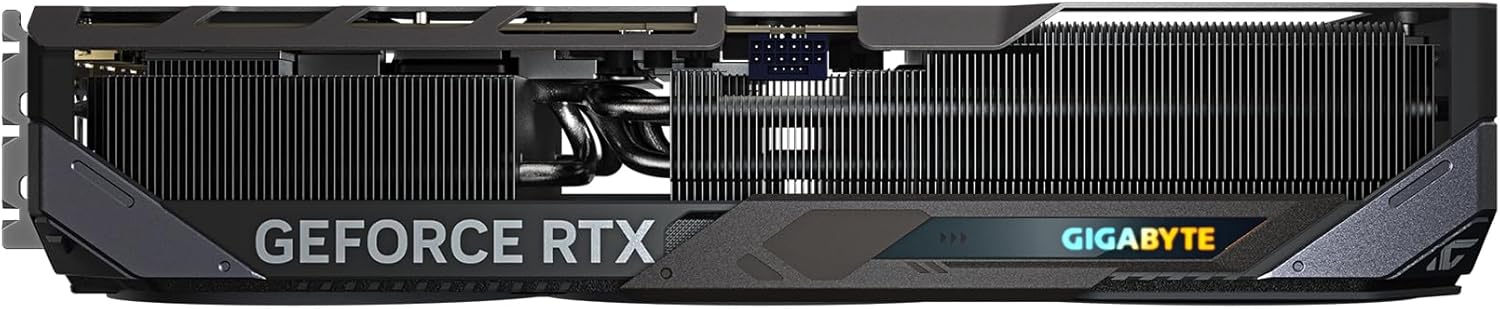
One practical note: most RTX 5080 cards on Amazon are AIB models from ASUS, MSI, GIGABYTE, and others, not the NVIDIA Founders Edition. AIB cards often run 320mm to 355mm in length. The Corsair Frame 4000D RS ARGB supports up to 430mm, so clearance is not a concern for any current RTX 5080 model. That said, always confirm the specific card length on the product listing before ordering.
AMD Ryzen 7 9800X3D or AMD Ryzen 7 7800X3D
Here is where most $2500 build guides get it wrong. They overspend on the CPU, justify it with 1080p benchmark data, and quietly deliver a system with a weaker GPU than it should have. That is the wrong trade at 4K. At this resolution, the performance difference between the Ryzen 7 9800X3D and the Ryzen 7 7800X3D is approximately 1 to 2%. Effectively zero. The GPU is handling the heavy lifting and the CPU is rarely the limiting factor.
So why recommend the 9800X3D at all? Because at this budget tier the premium is justifiable. The 9800X3D is the better CPU in every other scenario: 1080p gaming, CPU-intensive titles, streaming while gaming, and content creation. If you ever drop resolution or play a CPU-sensitive game, the 9800X3D is meaningfully ahead. For a deeper look at how the top gaming CPUs stack up, see our Best CPUs for Gaming 2026 guide.
When should you choose the 7800X3D instead? When pricing pushes the total build cost uncomfortably high. The 7800X3D is not a downgrade for 4K gaming. It is a strategic swap that puts approximately $100 back into your pocket with no meaningful loss at this resolution. Both CPUs are on AM5, both support DDR5-6000, and both pair identically with the rest of this build. The honest summary: 9800X3D is the premium choice, 7800X3D is the smart adjustment.
Thermalright Peerless Assassin 120 SE
The 9800X3D runs cooler and more efficiently than most high-end CPUs. It does not need a 360mm AIO. The Thermalright Peerless Assassin 120 SE is a dual-tower air cooler that keeps the 9800X3D well within safe operating temperatures under sustained gaming load. It costs approximately $35. The money you would spend on a premium AIO goes toward the GPU instead, which is the only component that moves the needle on 4K gaming performance. This is one of the most reviewed and trusted air coolers available, and it is the right call at this build tier.
MSI MAG B850 Tomahawk MAX WiFi
One of the most common mistakes at this budget tier is overspending on the motherboard. An X870 or X870E board adds $50 to $150 over the B850 Tomahawk MAX WiFi and delivers no meaningful gaming performance improvement. This board has a 14+2+1 80A VRM that handles the 9800X3D without throttling, PCIe 5.0 x16 for the RTX 5080, two PCIe 5.0 M.2 slots for future Gen5 storage, WiFi 7, 5G LAN, and four M.2 slots total. Real-world testing with the 9800X3D confirms performance is in line with significantly more expensive X870 boards. The money saved here goes toward the GPU where it belongs.
G.Skill Flare X5 32GB DDR5-6000 CL30
DDR5-6000 is the sweet spot for AM5. It runs in a 1:1 ratio with AMD’s Infinity Fabric, which is the configuration the memory controller is optimized for. Anything faster introduces latency that cancels out the bandwidth gains. The G.Skill Flare X5 uses AMD EXPO profiles, so hitting DDR5-6000 is a single BIOS toggle after first boot. 32GB is the right capacity for a 4K gaming system in 2026, sufficient for multitasking alongside gaming and well-positioned for the next several years of titles. For more on RAM selection and current pricing, see our Best RAM for Gaming 2026 guide.
Samsung 990 EVO Plus 2TB
A 4K gaming library fills storage faster than expected. Modern AAA titles regularly exceed 100GB. Starting with 2TB means you are not making hard choices about what to uninstall within the first few months. The Samsung 990 EVO Plus is a Gen4 NVMe drive with strong real-world performance and Samsung’s proven reliability track record. The B850 Tomahawk MAX WiFi has additional M.2 slots available for easy expansion later.
Corsair Frame 4000D RS ARGB
The Frame 4000D RS ARGB supports GPU lengths up to 430mm, well above any current RTX 5080 AIB model. The redesigned 3D Y-pattern front panel delivers improved front intake airflow over the previous 4000D design, which matters when the RTX 5080 is pulling over 300W under sustained 4K load. Three RS120 fans come pre-installed. It supports ATX motherboards and CPU coolers up to 170mm. At approximately $100 to $110 it is the right level of spend on a case at this budget tier.
Corsair RM850e 850W 80+ Gold
NVIDIA officially recommends 850W for RTX 5080 builds. The 9800X3D draws approximately 120W under gaming load, which means the RTX 5080 and CPU combined sit comfortably within 850W with headroom for transient power spikes. The RM850e is a fully modular 80+ Gold unit with a clean reputation for stable power delivery. Do not cut costs on the PSU at a $2500 build tier. A failed or underpowered PSU can damage every component connected to it.
Where We Saved Money on Purpose
This build is deliberate about where budget goes and where it does not. Every dollar saved on a supporting component is a dollar that could have gone toward the GPU. In a 4K build, that is the only trade that matters.
B850 over X870E: An X870E motherboard adds $50 to $150 and delivers no gaming performance improvement over the B850 Tomahawk MAX WiFi. That money goes toward the GPU.
Air cooling over AIO: The 9800X3D’s power draw does not justify an $80 to $120 AIO cooler. The Peerless Assassin 120 SE handles it at $35. The savings go toward the GPU.
32GB over 64GB: 64GB DDR5 is expensive right now due to the global memory shortage and adds zero gaming performance. No current game needs more than 32GB. There is no scenario where a 4K gaming build needs 64GB today.
Functional case over premium case: The Frame 4000D RS ARGB is a well-built, high-airflow case at a fair price. Spending $150 to $200 on a case with a bigger name does not improve 4K frame rates. That money goes toward the GPU.
Compatibility Checklist
Every part in this build has been cross-checked for compatibility. Here is a summary for first-time builders.
- CPU and motherboard: Ryzen 7 9800X3D uses the AM5 socket. The MSI MAG B850 Tomahawk MAX WiFi is an AM5 board. No BIOS flash required. The 9800X3D is supported out of the box.
- Memory: G.Skill Flare X5 DDR5-6000 is validated for AMD B850 platforms. Install both sticks in the A2 and B2 slots for dual-channel operation. Enable EXPO in BIOS after first boot to reach rated DDR5-6000 speed.
- GPU installation: The RTX 5080 installs in the primary PCIe 5.0 x16 slot. The card requires one 16-pin 12V-2×6 power connector. Make sure the connector is fully seated and clicks into place. Do not leave it partially inserted or allow the cable to bend sharply near the connector head.
- GPU length: The Corsair Frame 4000D RS ARGB supports up to 430mm. All current RTX 5080 AIB models fit with clearance to spare. Confirm the specific length of the card you are purchasing before ordering.
- CPU cooler height: The Thermalright Peerless Assassin 120 SE is 155mm tall. The Frame 4000D RS ARGB supports coolers up to 170mm. Confirmed compatible with 15mm of clearance.
- RAM clearance: The G.Skill Flare X5 is 33mm tall. The Peerless Assassin 120 SE has 46mm of RAM clearance. No interference.
- Storage: Install the Samsung 990 EVO Plus 2TB in the M2_1 slot and use the motherboard’s M.2 heatsink if needed. Additional M.2 slots are available for future storage expansion without any other changes to the build.
- PSU: The Corsair RM850e is fully modular. Route the 24-pin motherboard cable, EPS CPU power cable, and GPU 16-pin power cable before installing the motherboard in the case. Always double-check current product listings before ordering as specifications can vary between AIB GPU models.
Upgrade Path
This build has a clear upgrade order when you are ready to push further.
- GPU upgrade: The RTX 5090 or next-generation flagship GPU drops directly into this platform without any other changes. This is the most impactful upgrade available when you want more 4K headroom.
- CPU upgrade: Both the 9800X3D and 7800X3D sit on AM5. Future Ryzen generations including Zen 6 will be drop-in upgrades on this board with a BIOS update.
- Storage expansion: Three additional M.2 slots are available on the B850 Tomahawk MAX WiFi. Adding a second NVMe drive is straightforward and requires no other changes.
- RAM upgrade: 64GB is available by replacing the current kit when capacity becomes a priority. DDR5 pricing is elevated now. 32GB is the right call today.
- PSU upgrade: If you move to an RTX 5090 class GPU in the future, step the PSU up to 1000W at that point. The current 850W unit is correct for this build.
Monitor Pairing
The RTX 5080 is a 4K GPU. To get the most out of it, pair it with a 4K monitor running at least 120Hz with HDMI 2.1 or DisplayPort 2.1 connectivity. A 4K 144Hz IPS panel gives you the best balance of color accuracy, response time, and frame rate headroom for most gamers. A 4K OLED at 120Hz delivers image quality that justifies every dollar spent on the GPU for single-player gaming.
Pairing this build with a 1440p monitor is not wrong, but it leaves performance on the table and misses the point of this build.
- See our picks for the Best 4K Gaming Monitors 2026
- Not sure which GPU tier matches your monitor? Use our GPU Monitor Match Tool
- Still deciding between 1440p and 4K? Read our 1440p vs 4K Gaming 2026 breakdown first
Frequently Asked Questions
Is $2500 enough for a 4K gaming PC in 2026?
Yes, with one honest caveat. A $2500 gaming PC build for 4K in 2026 is absolutely achievable, but current GPU pricing means the real-world cost sits closer to $2,700 to $2,750. The $2500 figure represents the target budget and philosophy of the build. What this budget buys you is the RTX 5080, the only GPU that makes genuine sense for dedicated 4K gaming without spending more on the graphics card alone than the entire rest of the system.
Do I need the Ryzen 7 9800X3D for 4K gaming?
No. At 4K the performance difference between the Ryzen 7 9800X3D and the Ryzen 7 7800X3D is approximately 1 to 2%, effectively zero. The GPU is doing the heavy lifting at this resolution. The 9800X3D is our primary recommendation because it is the best gaming CPU available and the premium is justifiable at this budget tier. But if pricing is unfavorable, the Ryzen 7 7800X3D is a legitimate strategic swap that saves approximately $100 with no meaningful 4K gaming performance loss.
Is 16GB VRAM enough for 4K gaming in 2026?
Yes. Current testing shows even the most demanding 4K AAA titles in 2026 typically use 12 to 14GB of VRAM at maximum settings. The RTX 5080’s 16GB GDDR7 gives genuine headroom above current demands and is well-positioned for the next several years. This is meaningfully more future-proof than 12GB options at similar price points. For a full breakdown of VRAM requirements by resolution and game type, see our How Much VRAM Do You Need for Gaming 2026 guide.
Should I use DLSS or just run native 4K?
Use DLSS Quality mode. It renders at approximately 67% of native resolution and uses AI reconstruction to produce output that is extremely close to native at normal viewing distances. It adds 20 to 30% more performance in most titles and the image quality at 4K DLSS Quality is sharper than native 1440p. For most people, there is no good reason to avoid it. If you are skeptical, test it on any supported title and compare. The difference will not be visible under normal gaming conditions.
Do I need 64GB of RAM for a 4K gaming build?
No. 64GB DDR5 is expensive right now due to the global memory shortage and adds zero gaming performance over 32GB. No current game requires more than 32GB. The money saved by staying at 32GB is better allocated toward the GPU, which is the only component that directly improves 4K gaming performance.
How long will this build last for 4K gaming?
For 4K gaming at high settings, this build should remain competitive for three to five years. The RTX 5080 is the correct GPU tier for 4K in 2026, not a stretch choice. The AM5 platform has a confirmed upgrade path through at least Zen 6, meaning the motherboard and DDR5 memory remain viable for future CPU upgrades. The GPU will eventually be the limiting factor, and the upgrade path to a future generation card is straightforward on this platform.
Should I wait for GPU prices to drop before building?
It depends on your situation. GPU pricing has trended down from its peak and continues to slowly improve. If you are flexible on timing and can wait a few months, there is a reasonable chance the RTX 5080 returns closer to $1,200. If you need the system now, this is the correct build at current pricing. You are paying a premium over MSRP, but you are getting the right GPU for the resolution target.
Final Verdict
The biggest mistake when building a $2500 gaming PC for 4K is trying to balance everything equally. That is how you end up with a weaker GPU, worse 4K performance, and a system that ages poorly. This build avoids that mistake.
The RTX 5080 defines the system. Everything else was chosen to support it without wasting money. Yes, current pricing pushes the total closer to $2,700 than $2500. That is not a flaw in the build. It is the reality of the GPU market in April 2026.
The right response is not to downgrade the GPU. The right response is to keep the GPU, then step down to the 7800X3D if you need to close the gap. For a 4K gaming build to work, the GPU cannot be a compromise. Everything else can flex. The GPU cannot. That is the rule this build was designed around, and it is the right rule.
Not sure which 4K monitor to pair with it? See our Best 4K Gaming Monitors 2026 picks, or use the GPU Monitor Match Tool to confirm your setup is matched correctly.