
Last updated: March 2026
Some links on this page are affiliate links. If you buy through them we may earn a small commission at no extra cost to you.
4K gaming monitors have reached a new level in 2026. Faster GPUs, improved display technology, and major advances in OLED and Mini-LED panels have made high-resolution gaming more accessible than ever. Modern 4K monitors now deliver not just sharper visuals, but also extremely smooth gameplay with refresh rates reaching 144Hz and even 240Hz.
Choosing the right 4K gaming monitor is no longer just about resolution. Buyers now have to consider panel technology, refresh rate, HDR performance, and screen size. OLED monitors deliver incredible contrast and motion clarity, Mini-LED displays provide extremely bright HDR performance, and high-refresh IPS monitors still offer excellent value for many gaming setups.
In this guide, we break down the best 4K gaming monitors in 2026 based on real-world gaming performance, panel quality, and overall value. Whether you want the best OLED gaming display, a high-refresh IPS option, or a more budget-friendly entry into 4K gaming, these are the monitors that currently make the most sense for PC gamers.
If you’re still deciding on the graphics card side of your setup, our Best GPUs for 4K Gaming guide can help you match the right GPU to a high-resolution gaming monitor.
On this page
- Quick Picks
- 4K Gaming Monitor Comparison
- How We Chose the Best 4K Gaming Monitors
- Best 4K Gaming Monitors
- OLED vs IPS vs Mini-LED for 4K Gaming
- 27-Inch vs 32-Inch 4K Monitors
- 144Hz vs 240Hz 4K Gaming Monitors
- Best GPUs for 4K Gaming Monitors
- Frequently Asked Questions
- Final Verdict
Quick Picks
If you want the short version, these are the 4K gaming monitors that currently make the most sense for different types of buyers. The picks below balance panel quality, refresh rate, HDR performance, and real-world value so you can quickly find the right monitor for your setup.
4K Gaming Monitor Comparison at a Glance
The table below gives you the fastest way to compare the core differences between the top 4K gaming monitors in this guide. It focuses on the things that matter most for real buyers: screen size, panel type, refresh rate, HDR tier, and the type of user each monitor fits best.
| Monitor | Size | Panel | Refresh Rate | HDR | Best For |
|---|---|---|---|---|---|
| ASUS ROG Swift PG32UCDM | 32″ | QD-OLED | 240Hz | True HDR | Best Overall |
| LG 32GS95UE-B | 32″ | OLED | 240Hz | True HDR | Best OLED |
| ASUS ROG Swift PG27UCDM | 27″ | QD-OLED | 240Hz | True HDR | Best 27″ |
| MSI MPG 321URX | 32″ | QD-OLED | 240Hz | True HDR | Best Value OLED |
| Gigabyte M32U | 32″ | IPS | 144Hz | HDR400 | Best IPS |
| Samsung Odyssey Neo G8 | 32″ | Mini-LED VA | 240Hz | High-End HDR | Best HDR |
| LG 27UP650-W | 27″ | IPS | 60Hz | HDR400 | Best Budget |
How We Chose the Best 4K Gaming Monitors
Not every 4K monitor deserves a recommendation. For this guide we focused on displays that deliver strong gaming performance, reliable panel quality, and real-world value for modern PC gaming setups.
Our recommendations are based on a combination of real-world testing data from trusted publications such as RTINGS, Tom’s Hardware, and PC Gamer, along with current availability, real-world pricing, and overall buyer value. The goal is to highlight monitors that actually make sense for gamers in 2026 rather than simply listing the newest or most expensive models.
Panel Technology
Panel technology plays a huge role in the gaming experience. Modern OLED and QD-OLED panels deliver the best contrast, near-instant response times, and exceptional HDR performance. IPS panels still provide excellent color accuracy and reliability, while Mini-LED displays can deliver extremely bright HDR highlights.
This guide includes a mix of OLED, IPS, and Mini-LED options so buyers can choose the technology that best fits their priorities and budget.
Refresh Rate and Motion Performance
High refresh rates matter even at 4K resolution. Many modern 4K gaming monitors now support 144Hz or 240Hz refresh rates, allowing powerful GPUs to deliver smoother gameplay in fast-paced titles.
We prioritized monitors that deliver strong motion performance, low response times, and reliable variable refresh rate support for technologies like NVIDIA G-SYNC and AMD FreeSync.
HDR Performance
One of the biggest advantages of high-end 4K monitors is HDR. Displays with OLED or Mini-LED backlighting can deliver dramatically better contrast, deeper blacks, and brighter highlights than traditional LCD panels.
While not every buyer needs the most advanced HDR performance, we included several monitors that truly showcase what modern HDR gaming can look like.
Real-World Value
Pricing matters just as much as specifications. Some monitors offer impressive specs on paper but are difficult to recommend due to price or availability.
Our picks focus on displays that consistently deliver strong value relative to their performance tier and are widely available from major retailers.
Best 4K Gaming Monitors
The picks below represent the strongest 4K gaming monitors for different types of buyers, from premium OLED panels to more practical IPS and budget options.
Best Overall 4K Gaming Monitor: ASUS ROG Swift PG32UCDM
- Screen Size: 32-inch
- Resolution: 3840 × 2160 (4K)
- Panel: QD-OLED
- Refresh Rate: 240Hz
- HDR: True HDR (OLED)
- Connectivity: HDMI 2.1, DisplayPort
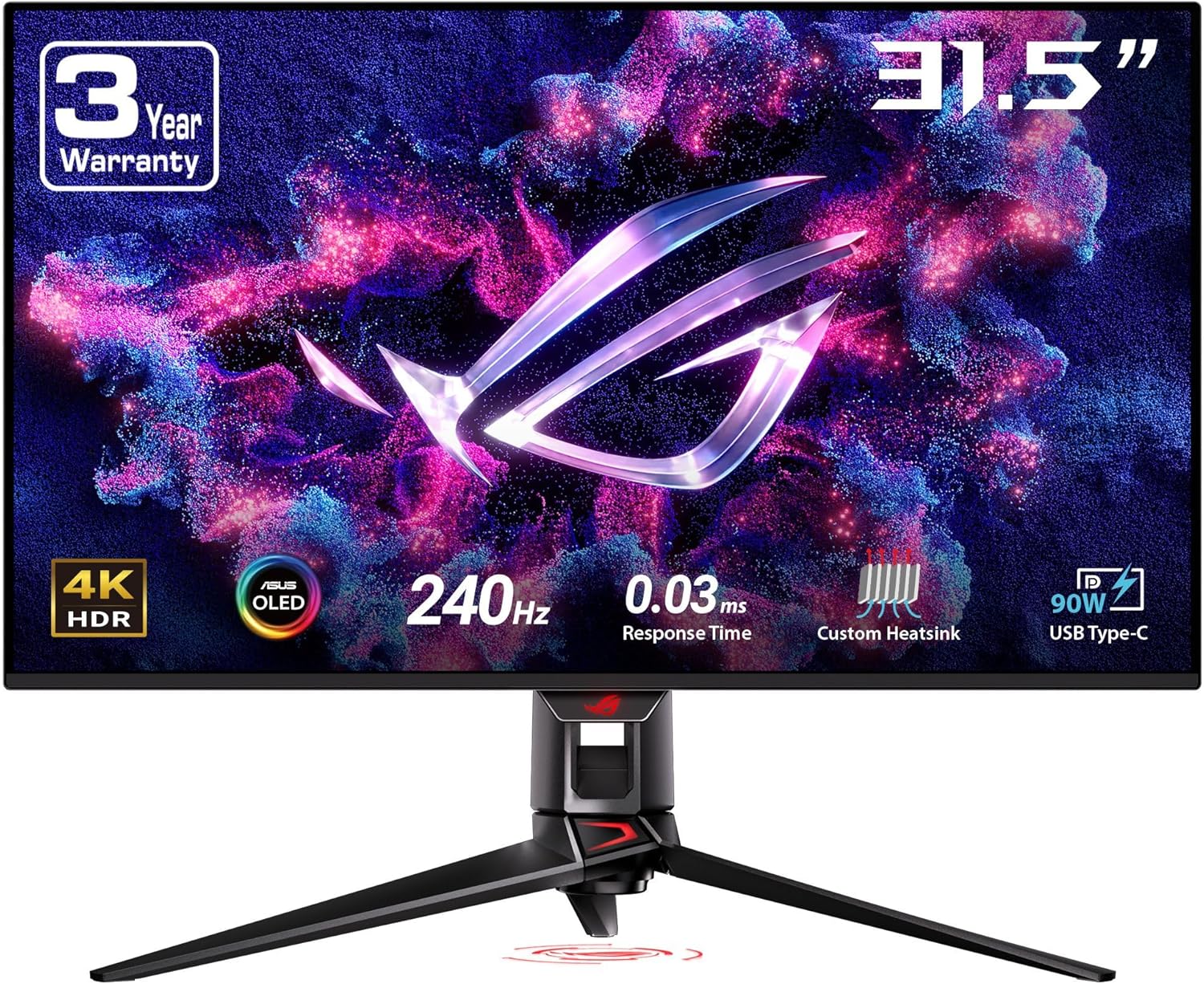
The ASUS ROG Swift PG32UCDM is one of the most impressive 4K gaming monitors currently available. It combines a 32-inch 4K QD-OLED panel with a 240Hz refresh rate, delivering exceptional image quality alongside elite gaming performance.
QD-OLED technology provides extremely deep blacks, excellent color accuracy, and near-instant response times. This results in incredibly smooth motion clarity and a level of contrast that traditional LCD panels struggle to match. For gamers who care about both visual quality and responsiveness, it represents a major step forward compared to older IPS-based 4K monitors.
The 240Hz refresh rate is also a major advantage. While not every game will push that level of performance at 4K, modern high-end GPUs such as the RTX 5070 Ti, RX 7900 XT, or RTX 5080 are increasingly capable of delivering very high frame rates in competitive titles.
HDR performance is another major strength. OLED panels allow each pixel to turn off individually, creating perfect blacks and extremely high contrast. This makes HDR content look dramatically better compared to standard LCD displays.
Who should buy it: Buy the ASUS ROG Swift PG32UCDM if you want the best all-around 4K gaming monitor available today with top-tier gaming performance and exceptional image quality.
Best OLED 4K Gaming Monitor: LG 32GS95UE-B
- Screen Size: 32-inch
- Resolution: 3840 × 2160 (4K)
- Panel: OLED
- Refresh Rate: 240Hz
- HDR: True HDR (OLED)
- Connectivity: HDMI 2.1, DisplayPort
The LG 32GS95UE-B is one of the most interesting 4K gaming monitors released in recent years. It uses a 32-inch OLED panel that delivers incredible contrast, extremely deep blacks, and near-instant pixel response times that make motion look exceptionally clean in fast-paced games.
OLED technology remains one of the best upgrades gamers can make to their display. Unlike traditional LCD panels, each pixel can turn off individually, creating perfect black levels and dramatically higher contrast. This makes HDR content look significantly more realistic and immersive.
One of the most unique features of the LG 32GS95UE-B is its dual-mode functionality. In addition to running at 4K 240Hz, the monitor can switch to a 1080p 480Hz mode for competitive esports gaming. This allows players to enjoy cinematic 4K visuals in story-driven titles while still having access to extremely high refresh rates for fast shooters.
For gamers who want premium OLED image quality combined with flexibility for both immersive and competitive play styles, the LG 32GS95UE-B is one of the most compelling options currently available.
Who should buy it: Buy the LG 32GS95UE-B if you want a premium OLED gaming monitor with incredible contrast and the flexibility to switch between immersive 4K gaming and ultra-fast competitive modes.
Best 27-Inch 4K Gaming Monitor: ASUS ROG Swift PG27UCDM
- Screen Size: 27-inch
- Resolution: 3840 × 2160 (4K)
- Panel: QD-OLED
- Refresh Rate: 240Hz
- HDR: True HDR (QD-OLED)
- Connectivity: HDMI 2.1, DisplayPort
The ASUS ROG Swift PG27UCDM is the strongest 27-inch option for gamers who want a smaller display without sacrificing performance. At this size, a 4K resolution delivers extremely high pixel density, making text, UI elements, and game environments look exceptionally sharp.
The monitor uses a QD-OLED panel, which combines the advantages of OLED contrast with the color brightness improvements of quantum dot technology. This results in vibrant colors, perfect black levels, and extremely fast response times that help eliminate motion blur in fast-paced games.
With a 240Hz refresh rate, the PG27UCDM is designed for high-end gaming systems capable of pushing very high frame rates. Competitive players who prefer slightly smaller displays often choose 27-inch monitors because they keep more of the screen within their natural field of view.
Another advantage of the 27-inch size is desk space. Many setups simply feel more comfortable with a slightly smaller display while still benefiting from the sharpness of 4K resolution.
Who should buy it: Buy the ASUS ROG Swift PG27UCDM if you want a smaller 4K gaming monitor with extremely high pixel density, elite motion performance, and premium OLED-level image quality.
Best Value OLED 4K Gaming Monitor: MSI MPG 321URX
- Screen Size: 32-inch
- Resolution: 3840 × 2160 (4K)
- Panel: QD-OLED
- Refresh Rate: 240Hz
- HDR: True HDR (QD-OLED)
- Connectivity: HDMI 2.1, DisplayPort
The MSI MPG 321URX is one of the most compelling value options in the high-end 4K gaming monitor market. It uses the same QD-OLED panel technology found in several flagship displays, delivering incredible contrast, fast response times, and excellent HDR performance.
Because it shares much of the same panel technology as more expensive models, the gaming experience remains extremely similar in many scenarios. Fast-paced games benefit from the near-instant pixel response of OLED panels, while HDR content looks far more dramatic than on traditional LCD displays.
Where the MSI MPG 321URX really stands out is its overall pricing compared to competing OLED monitors. Buyers who want premium 4K gaming performance but are trying to avoid the very highest price tier will often find this monitor to be a strong balance of performance and value.
It also maintains the 240Hz refresh rate that many gamers want when pairing a 4K monitor with a powerful modern GPU. This makes it capable of delivering both extremely smooth competitive gameplay and visually stunning single-player experiences.
Who should buy it: Buy the MSI MPG 321URX if you want premium 4K OLED gaming performance but prefer a more balanced price compared to the most expensive flagship models.
Best IPS 4K Gaming Monitor: Gigabyte M32U
- Screen Size: 32-inch
- Resolution: 3840 × 2160 (4K)
- Panel: IPS
- Refresh Rate: 144Hz
- HDR: HDR400
- Connectivity: HDMI 2.1, DisplayPort
The Gigabyte M32U has remained one of the most consistently recommended 4K gaming monitors for several years because it strikes a very practical balance between performance and price. While OLED displays currently dominate the premium gaming monitor market, many gamers still prefer IPS panels due to their reliability and lower cost.
This monitor delivers a 144Hz refresh rate at 4K resolution, which is still an excellent match for modern gaming PCs. High-end graphics cards such as the RTX 5070 Ti, RX 7900 XT, and RX 7900 XTX can deliver strong frame rates at this resolution in many modern games.
Another advantage of the Gigabyte M32U is its HDMI 2.1 support. This allows the monitor to work well not only with gaming PCs but also with modern consoles such as the PlayStation 5 and Xbox Series X, making it a versatile display for mixed gaming setups.
While its HDR performance cannot compete with OLED or Mini-LED displays, the M32U still delivers strong color accuracy, good brightness levels, and a smooth gaming experience that makes it one of the most practical 4K gaming monitors available.
Who should buy it: Buy the Gigabyte M32U if you want a strong 4K gaming monitor with a high refresh rate and excellent overall value without paying premium OLED prices.
Best HDR 4K Gaming Monitor: Samsung Odyssey Neo G8
- Screen Size: 32-inch
- Resolution: 3840 × 2160 (4K)
- Panel: Mini-LED VA
- Refresh Rate: 240Hz
- HDR: Quantum HDR2000
- Connectivity: HDMI 2.1, DisplayPort
The Samsung Odyssey Neo G8 is one of the most impressive HDR gaming monitors currently available. Unlike standard LCD displays, it uses Mini-LED backlighting with thousands of local dimming zones, allowing it to produce extremely bright highlights while still maintaining deep blacks.
This technology gives the Neo G8 a major advantage when displaying HDR content. Explosions, sunlight, and bright environments can appear dramatically brighter than on traditional monitors, creating a much more immersive visual experience.
The Neo G8 also maintains a very fast 240Hz refresh rate at full 4K resolution, making it capable of extremely smooth gameplay when paired with powerful modern graphics cards such as the RTX 5080 or RTX 5090.
Samsung’s Odyssey lineup is also known for its aggressive 1000R curve. This design can feel more immersive for some players by pulling the edges of the screen slightly closer to the viewer, though it may take a short adjustment period for users who are accustomed to flat panels.
Who should buy it: Buy the Samsung Odyssey Neo G8 if you want one of the brightest HDR gaming monitors available and care about extremely vivid highlights in modern games.
Best Budget 4K Gaming Monitor: LG 27UP650-W
- Screen Size: 27-inch
- Resolution: 3840 × 2160 (4K)
- Panel: IPS
- Refresh Rate: 60Hz
- HDR: HDR10
- Connectivity: HDMI, DisplayPort
The LG 27UP650-W is a practical choice for buyers who want to experience 4K resolution without stepping into the much higher price tier of premium gaming monitors. While it does not offer high refresh rates like the other displays in this guide, it still delivers the core benefit of 4K: extremely sharp image quality.
At 27 inches, a 4K panel provides very high pixel density. Text, UI elements, and fine details in games appear noticeably sharper compared to lower resolutions. For players who primarily enjoy slower-paced games, strategy titles, or single-player experiences, a 60Hz refresh rate may still be perfectly acceptable.
IPS panel technology also helps maintain good color accuracy and wide viewing angles, making the monitor suitable not only for gaming but also for general desktop use, productivity, and media consumption.
This type of monitor can pair well with mid-range graphics cards such as the RTX 5070 Ti or RX 7900 XT if the goal is to enjoy 4K visuals without pushing extremely high frame rates.
Who should buy it: Buy the LG 27UP650-W if you want a simple and affordable way to experience 4K resolution and do not need the high refresh rates found on premium gaming monitors.
OLED vs IPS vs Mini-LED for 4K Gaming
One of the biggest decisions when buying a 4K gaming monitor is choosing the right panel technology. In today’s market, most buyers are deciding between OLED, IPS, and Mini-LED. Each has real strengths, and the best choice depends on how you actually use your monitor.
OLED panels deliver the best contrast and motion clarity. Because each pixel can turn off individually, OLED monitors produce perfect blacks, extremely high contrast, and outstanding HDR performance. They also offer near-instant response times, which helps motion look exceptionally clean in fast-paced games. If you want the most impressive overall picture quality for gaming, OLED is currently the premium option.
IPS panels are still a strong choice for many gamers because they offer reliable color accuracy, good viewing angles, and lower pricing than OLED. A high-refresh IPS monitor can still deliver an excellent gaming experience, especially for buyers who want 4K resolution and smooth performance without stepping into premium OLED pricing. The tradeoff is that IPS panels cannot match OLED or Mini-LED for deep blacks and HDR impact.
Mini-LED sits in between. These monitors use LCD panels with a much more advanced backlight system that includes many local dimming zones. This allows them to get much brighter than OLED in HDR highlights while also improving contrast compared to standard IPS displays. Mini-LED is especially attractive for buyers who want extremely bright HDR performance, though blooming and backlight behavior can still vary by model.
For most LoadedRig readers, the decision is fairly simple. If you want the best image quality and are willing to pay for it, OLED is the strongest choice. If you want a more practical balance of price and performance, IPS still makes a lot of sense. If HDR brightness is your top priority, Mini-LED is the most compelling alternative.
27-Inch vs 32-Inch 4K Gaming Monitors
One of the most common questions buyers have when shopping for a 4K gaming monitor is whether they should choose a 27-inch or 32-inch display. Both sizes can work extremely well, but they offer slightly different experiences depending on your desk setup and gaming preferences.
27-inch 4K monitors deliver extremely high pixel density. Because the same 4K resolution is packed into a smaller screen, images appear exceptionally sharp. Text, fine details, and UI elements look incredibly crisp, which can make the overall desktop and gaming experience feel very refined.
Many competitive players also prefer 27-inch displays because they keep more of the screen within their natural field of view. This can make fast-paced games feel easier to track without moving your eyes as much.
32-inch 4K monitors, on the other hand, offer a larger and more immersive experience. The bigger screen can make games feel more cinematic and visually impressive, especially for open-world titles and story-driven games.
The larger display also makes UI elements and text easier to read without scaling, which some users find more comfortable during long gaming sessions.
For many gamers, 32 inches has become the new sweet spot for 4K gaming monitors. However, 27-inch models are still excellent for buyers who prefer slightly smaller displays or have limited desk space.
144Hz vs 240Hz 4K Gaming Monitors
Modern 4K gaming monitors now come in two main refresh rate tiers: 144Hz and 240Hz. Both can deliver extremely smooth gameplay, but they are designed for slightly different types of gaming setups.
144Hz has long been considered the sweet spot for 4K gaming. It delivers very smooth motion compared to older 60Hz displays while remaining achievable for many modern GPUs. For most players, 144Hz already feels extremely responsive and provides an excellent balance between visual quality and performance.
240Hz is the newer premium tier for 4K gaming monitors. Displays in this category are designed for powerful gaming PCs capable of pushing extremely high frame rates in competitive titles. Fast shooters and esports-style games benefit the most from this higher refresh rate because motion looks even smoother and input latency is reduced.
However, reaching 240 FPS at 4K resolution requires extremely powerful graphics cards. Many modern AAA games will still run closer to the 100-160 FPS range even on high-end systems.
Because of this, many gamers will find that a 144Hz monitor is still the most practical choice for 4K gaming. Meanwhile, 240Hz displays make the most sense for enthusiasts building extremely powerful PCs or players who want the smoothest possible experience in competitive games.
If you plan to pair your monitor with powerful graphics cards such as the RTX 5070 Ti, RX 7900 XT, RTX 5080, or RTX 5090, higher refresh rate monitors become much easier to take advantage of.
Best GPUs for 4K Gaming Monitors
Choosing the right graphics card is just as important as choosing the right monitor when gaming at 4K resolution. Because 4K contains four times as many pixels as 1080p, it places significantly more demand on your GPU.
While many modern graphics cards can technically run games at 4K, achieving high frame rates — especially on 144Hz or 240Hz monitors — requires a powerful GPU. The table below highlights several GPUs that pair well with modern 4K gaming monitors.
| GPU | Best Monitor Match | Why It Fits |
|---|---|---|
| RTX 5070 Ti | 4K 144Hz | A strong starting point for smooth 4K gaming in many modern titles. |
| RX 7900 XT | 4K 144Hz | Excellent raster performance for high-resolution gaming. |
| RX 7900 XTX | 4K 144Hz – 240Hz | One of AMD’s strongest GPUs for high-refresh 4K gameplay. |
| RTX 5080 | 4K 240Hz | High-end performance designed for demanding modern games. |
| RTX 5090 | 4K 240Hz+ | Maximum performance for pushing extremely high frame rates at 4K. |
If you are still deciding which graphics card makes the most sense for your build, see our Best GPUs for 4K Gaming guide for direct 4K recommendations. If you are comparing other resolutions too, our Best GPUs for 1440p Gaming and Best GPUs for 1080p Gaming guides are also worth reading.
Frequently Asked Questions
Is 4K worth it for gaming in 2026?
Yes. 4K gaming continues to grow in popularity as modern GPUs become more powerful and high-refresh 4K monitors become more common. The higher resolution delivers noticeably sharper visuals, more detailed environments, and a more immersive overall gaming experience compared to lower resolutions.
What size monitor is best for 4K gaming?
For most players, 32-inch monitors have become the sweet spot for 4K gaming. They provide a larger and more immersive display while keeping the pixel density high enough to maintain sharp visuals. However, 27-inch monitors can still be a great option for players who prefer smaller screens or have limited desk space.
Do I need a 240Hz monitor for 4K gaming?
No. While 240Hz monitors offer extremely smooth motion, many gamers will find that 144Hz is already an excellent refresh rate for 4K gaming. Reaching 240 FPS at 4K resolution requires extremely powerful hardware and is most beneficial for competitive titles rather than demanding AAA games.
Is OLED better than IPS for gaming monitors?
In many cases, yes. OLED panels deliver perfect blacks, extremely high contrast, and near-instant response times, which can make motion look clearer and HDR content appear far more impressive. IPS panels still offer strong color accuracy and reliability, but they typically cannot match the contrast levels of OLED displays.
Do I need a powerful GPU for 4K gaming?
Yes. Because 4K resolution contains four times as many pixels as 1080p, it requires significantly more graphics processing power. High-end GPUs such as the RTX 5070 Ti, RX 7900 XT, RTX 5080, and RTX 5090 are typically recommended for smooth 4K gaming.
Final Verdict
If we had to recommend one monitor to the average LoadedRig reader looking for a 4K gaming display today, it would be the ASUS ROG Swift PG32UCDM. It delivers an outstanding combination of QD-OLED image quality, a 240Hz refresh rate, and premium HDR performance that makes it one of the most complete 4K gaming monitors currently available.
If you want an excellent OLED gaming experience with a unique competitive advantage, the LG 32GS95UE-B is another standout option thanks to its dual-mode feature that can switch between 4K gaming and extremely high refresh competitive play.
Buyers who want a slightly smaller display with incredible pixel density should consider the ASUS ROG Swift PG27UCDM, while the MSI MPG 321URX remains one of the best value ways to step into premium OLED gaming.
If you prefer a more traditional IPS display, the Gigabyte M32U is still one of the most reliable 4K gaming monitors available, while the Samsung Odyssey Neo G8 stands out for gamers who want extremely bright HDR performance.
Finally, if your goal is simply to experience 4K resolution without spending premium gaming monitor prices, the LG 27UP650-W remains a solid budget-friendly entry point.