
Last updated: March 2026
Some links on this page are affiliate links. If you buy through them we may earn a small commission at no extra cost to you.
1080p is still one of the best places to be for PC gaming. It is affordable, easy for modern GPUs to drive, and ideal for high refresh rate gameplay. Many of the best 1080p gaming monitors deliver extremely smooth performance, making them a great choice for competitive players and budget gaming setups alike. Whether you are building a new PC, upgrading your display, or pairing a monitor with a strong 1080p GPU, there are still excellent reasons to choose a 1080p display in 2026.
The key is choosing the right type of 1080p monitor. At this resolution, size matters more than many buyers realize. A 24-inch monitor generally looks sharper and makes the most sense for competitive gaming, while a 27-inch monitor trades some sharpness for a larger and more immersive screen. In this guide, we break down the best 1080p gaming monitors in 2026 with separate picks for both 24-inch and 27-inch buyers.
On this page
- Quick Picks
- 1080p Monitor Comparison
- Best 24-Inch 1080p Gaming Monitors
- Best 27-Inch 1080p Gaming Monitors
- 24-Inch vs 27-Inch at 1080p
- 144Hz vs 165Hz vs 240Hz vs 360Hz
- GPU Pairing Guide
- Frequently Asked Questions
Quick Picks
If you just want the short version, these are the 1080p gaming monitors that currently make the most sense for different types of buyers. The picks below balance availability, refresh rate, panel quality, and overall value so you can quickly find the right monitor for your setup.
1080p Gaming Monitor Comparison at a Glance
| Monitor | Size | Refresh Rate | Panel | Best For |
|---|---|---|---|---|
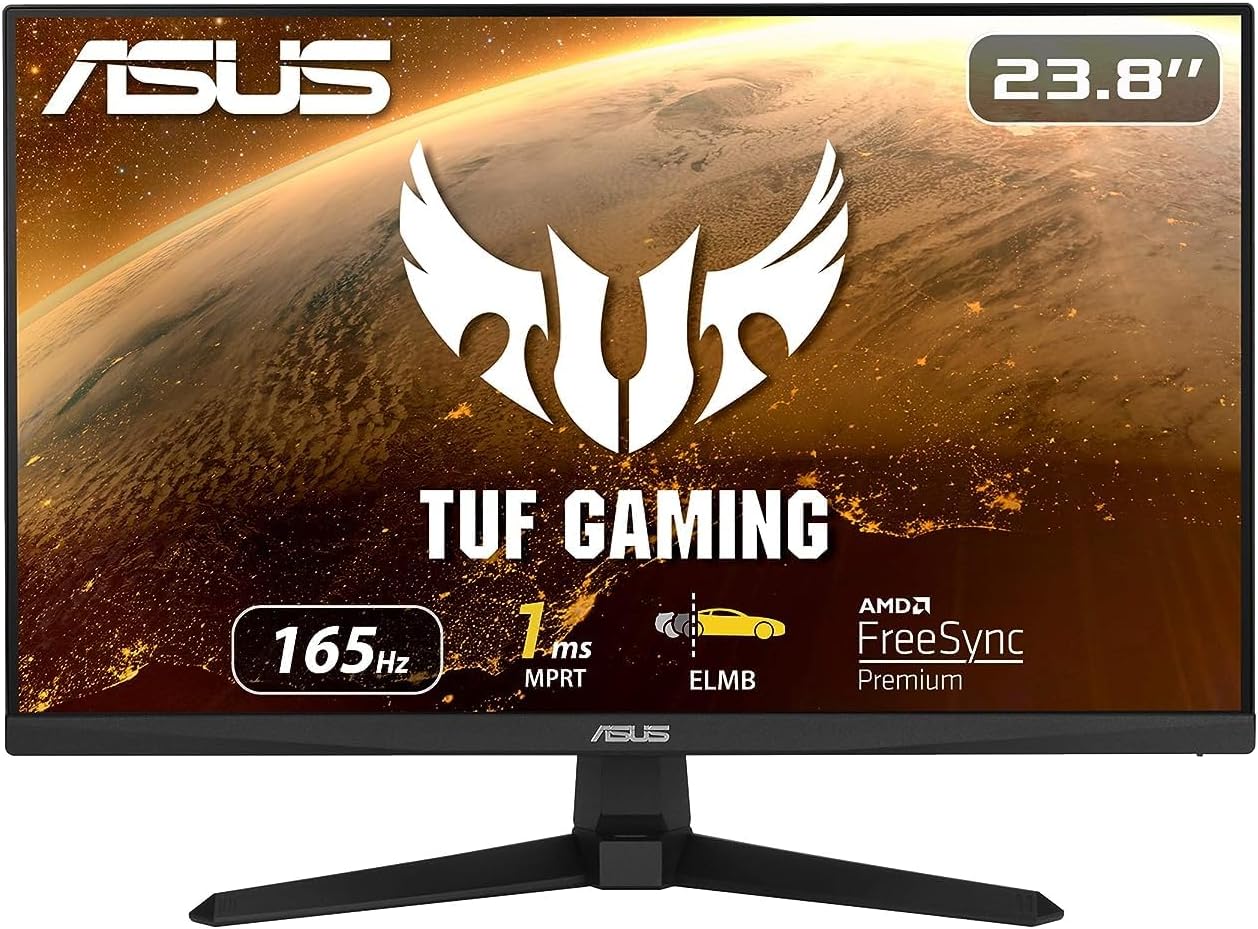
| ASUS TUF VG249Q1A | 23.8″ | 165Hz | IPS | Best Overall 24″ |
| Acer Nitro KG241Y | 23.8″ | 165Hz | IPS | Best Budget 24″ |
| Samsung Odyssey G4 | 25″ | 240Hz | IPS | Best 240Hz |
| Alienware AW2523HF | 24.5″ | 360Hz | IPS | Best 360Hz |
| LG UltraGear 27GP750-B | 27″ | 240Hz | IPS | Best 27″ |
| Acer Nitro 27″ 165Hz | 27″ | 165Hz | IPS | Best Budget 27″ |
| ASUS VG277Q1A | 27″ | 165Hz | IPS | Alternative 27″ |
How We Chose the Best 1080p Gaming Monitors
Not every 1080p monitor deserves a recommendation. For this guide we focused on models that deliver strong gaming performance, reliable panel quality, and pricing that makes sense for real-world PC builds.
Several factors were considered when selecting the monitors in this list.
Refresh Rate and Motion Performance
High refresh rate support is one of the biggest advantages of gaming at 1080p. Modern GPUs can easily push high frame rates at this resolution, so we focused on monitors offering at least 165Hz, with additional picks for 240Hz and 360Hz competitive gaming.
Panel Type
Most of our recommendations use IPS panels because they typically offer better motion clarity, viewing angles, and overall consistency compared to cheaper VA alternatives. While VA panels can still be good in some cases, IPS monitors tend to be the safest recommendation for gaming.
Real-World Value
Pricing matters. Some monitors offer strong specifications but do not deliver good value for the cost. Our picks focus on displays that consistently make sense for their price tier and are widely available from reputable brands.
Trusted Brands and Availability
We prioritized monitors from brands with solid reputations in gaming displays, including ASUS, LG, Samsung, Acer, and Alienware. These companies consistently produce reliable monitors and maintain better quality control than many lower-cost alternatives.
Best 24-Inch 1080p Gaming Monitors
For 1080p gaming, 24-inch and 24.5-inch displays are still the sweet spot for sharpness and competitive play. They keep pixel density tighter, they are easier to sit close to, and they remain the most common size for serious FPS and esports players.
Best Overall 24-Inch 1080p Monitor: ASUS TUF VG249Q1A
The ASUS VG249Q1A is the safest overall 24-inch recommendation in this guide because it hits the core things most gamers actually need. It gives you a 165Hz refresh rate, an IPS panel, solid motion performance, and a price point that still makes sense for mainstream gaming builds.
This is the kind of monitor that works equally well for a budget-friendly 1080p setup, a first gaming PC, or a faster esports-leaning build that does not need to go all the way to 240Hz. If you want a clean, no-nonsense pick for 1080p gaming, this is it.
Who should buy it: Buy the ASUS VG249Q1A if you want the best all-around 24-inch 1080p gaming monitor without overspending.
Best Budget 24-Inch 1080p Monitor: Acer Nitro KG241Y
The Acer Nitro KG241Y is the budget pick because it still gives you what matters most for gaming: a proper high refresh rate, a 1080p panel, and a price that works for entry-level setups.
This is the kind of monitor that pairs especially well with lower-cost gaming PCs and budget GPU builds where you still want smooth gameplay without spending a huge amount on the display.
Who should buy it: Buy the Acer Nitro KG241Y if you want a strong budget 1080p monitor with high refresh performance for the money.
Best 240Hz 24-Inch Monitor: Samsung Odyssey G4
If you mainly play competitive shooters and want a real step up from 165Hz, the Samsung Odyssey G4 is one of the best ways to get there. Its 240Hz refresh rate delivers noticeably smoother motion and cleaner tracking in fast-paced games.
Who should buy it: Buy the Samsung Odyssey G4 if you want a real 240Hz competitive gaming upgrade without jumping all the way into 360Hz pricing.
Best 360Hz 24-Inch Monitor: Alienware AW2523HF
The Alienware AW2523HF is the premium esports pick in this guide. A 360Hz panel is not something most gamers actually need, but it is the right call for buyers who want elite-level smoothness and extremely low input lag.
Who should buy it: Buy the Alienware AW2523HF if you mainly play competitive games and want one of the best 360Hz esports monitors available.
Best 27-Inch 1080p Gaming Monitors
27-inch 1080p monitors are less about sharpness and more about screen size, comfort, and immersion. They are popular with buyers who want a larger display for gaming, general use, and mixed setups, even if 1080p looks a little softer at this size than it does on a 24-inch panel.
Best Overall 27-Inch 1080p Monitor: LG UltraGear 27GP750-B
The LG UltraGear 27GP750-B is the strongest 27-inch pick in this guide because it combines the larger 27-inch format with genuinely fast 240Hz performance. If you want a bigger screen but still care about competitive smoothness, this is the most compelling 27-inch 1080p option in the article.
It also avoids the lower-quality VA compromises that often show up in this size and refresh tier, making it easier to recommend with confidence.
Who should buy it: Buy the LG UltraGear 27GP750-B if you want the best 27-inch 1080p gaming monitor with high refresh performance and a larger, more immersive screen.
Best Budget 27-Inch 1080p Monitor: Acer Nitro 27″ 165Hz
The Acer Nitro 27-inch 165Hz option fills an important role in this guide. Not everyone wants to pay for a premium 27-inch gaming display, and this gives buyers a larger screen with smooth refresh performance without spending much more than they would on some smaller 24-inch options.
This is a practical pick for casual gamers, console players, and budget-conscious buyers who want size first and still want the smoothness of a proper gaming panel.
Who should buy it: Buy this Acer Nitro if you want a budget-friendly 27-inch gaming monitor and care more about screen size than chasing top-tier specs.
Best Alternative 27-Inch 1080p Monitor: ASUS VG277Q1A
The ASUS VG277Q1A is a strong alternative if you want a 27-inch 1080p display from the ASUS TUF lineup and do not need to stretch for 240Hz. It still gives you 165Hz smoothness, an IPS-style viewing experience, and a bigger gaming screen for buyers who know they want size first.
It is not the sharpest way to experience 1080p, and we should be honest about that. But if you know you want a 27-inch 1080p monitor and do not want to spend more for 1440p, it is still a valid and practical choice.
Who should buy it: Buy the ASUS VG277Q1A if you want a larger 27-inch 1080p gaming monitor with a balanced mix of size, speed, and value.
24-Inch vs 27-Inch at 1080p
This is one of the most important choices in the entire guide. At 1080p, the same resolution looks different depending on screen size.
24-inch monitors usually make the most sense for sharper image quality and competitive gaming. They are easier to sit close to, they keep the pixel density tighter, and they remain the standard size for a lot of esports players.
27-inch monitors give you a larger, more immersive screen, but they do look softer at 1080p. That does not make them bad. It just means they are better suited to buyers who care more about size and comfort than maximum sharpness.
If you sit close to your monitor and care about image crispness, go 24-inch. If you want a larger display for casual gaming, general use, and a more immersive feel, 27-inch can still be the right call.
144Hz vs 165Hz vs 240Hz vs 360Hz
Most modern 1080p gaming monitors now start at 165Hz or higher, and that makes sense. Modern GPUs can easily push well past 144 FPS at 1080p, so higher refresh rate displays make better use of the performance you are paying for.
165Hz is the sweet spot for most gamers. It feels clearly smoother than 60Hz or 120Hz while still staying affordable.
240Hz is where serious competitive gaming starts to feel meaningfully different. Motion looks smoother, tracking gets easier, and fast shooters feel more responsive.
360Hz is for a smaller audience. It is not the right upgrade for everyone, but for dedicated esports players it can still be worth it.
Best GPU Pairings for 1080p Gaming Monitors
The right monitor also depends on the kind of GPU you are pairing it with. A budget GPU does not need a 360Hz esports display, and a stronger 1080p card can take advantage of much higher refresh rates.
| GPU Tier | Best Monitor Match | Why It Fits |
|---|---|---|
| Entry 1080p GPU (RX 6600 / RTX 3050) | 165Hz monitor | Best balance for mainstream gaming performance and cost. |
| Strong 1080p GPU (RX 7600 / RTX 4060) | 165Hz to 240Hz monitor | Lets you take advantage of higher frame rates in competitive games. |
| High-end 1080p GPU (RTX 4070-class and up) | 240Hz to 360Hz monitor | Best fit for esports players chasing very high FPS and ultra smooth motion. |
If you are still deciding on the graphics card side of your setup, see our Best GPUs for 1080p Gaming 2026 guide. If you are building a full system around this resolution, our Best $1,000 1080p Gaming PC Build 2026 guide is also worth reading.
Frequently Asked Questions
Is 1080p still good for gaming in 2026?
Yes. 1080p is still one of the best resolutions for high refresh rate gaming, budget-friendly PC builds, and competitive shooters. It remains especially strong if you care about hitting high FPS without needing a very expensive graphics card.
What size monitor is best for 1080p gaming?
For most players, 24-inch is the best size for 1080p gaming because it keeps the image sharper and works especially well for competitive play. 27-inch monitors can still work at 1080p, but they trade some sharpness for a larger and more immersive screen.
Is 27-inch too big for 1080p gaming?
Not necessarily, but it is less sharp than 24-inch at the same resolution. A 27-inch 1080p monitor makes sense if you care more about screen size and immersion than maximum pixel density.
Is 240Hz worth it for 1080p gaming?
Yes, if you mainly play fast competitive games and your PC can produce high enough frame rates. For most casual gamers, 165Hz is already excellent. For competitive players, 240Hz can be a meaningful upgrade.
Do I need 360Hz for esports?
No, but it can make sense if you are highly competitive and want one of the fastest displays available. For most people, 240Hz is already more than enough.
Should I buy IPS or VA for a 1080p gaming monitor?
For most gamers, IPS is the safer recommendation because it generally offers better motion handling and fewer ghosting issues than cheaper VA gaming panels. VA can still be fine for some buyers, but IPS is easier to recommend broadly.
Final Verdict
If we had to recommend one monitor to the average LoadedRig reader shopping for a 1080p display today, it would be the ASUS TUF VG249Q1A. It is the cleanest all-around answer because it delivers 165Hz smoothness, a quality IPS panel, and a price that still makes sense for most buyers.
If you want the best budget option, the Acer Nitro KG241Y is a smart place to start.
If you want a real competitive upgrade, the Samsung Odyssey G4 is the stronger 240Hz choice, while the Alienware AW2523HF is the premium 360Hz esports pick.
For larger-screen buyers, the LG UltraGear 27GP750-B is the best overall 27-inch recommendation, while the Acer Nitro 27″ 165Hz and ASUS VG277Q1A give you two strong lower-cost alternatives.